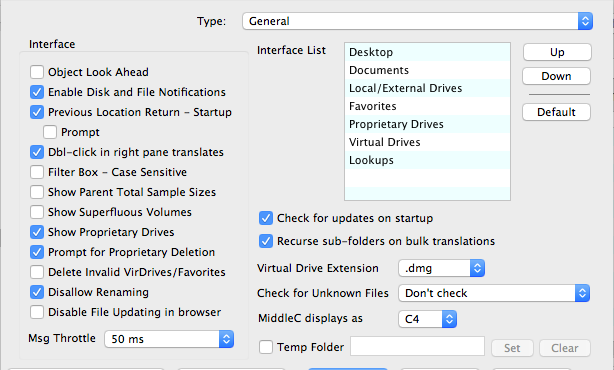
Translator™ Preferences

Translator has a massive amount of optional parameters you can invoke on everything from the dialog view to the specifics of the translations that you perform. It's easy to get intimidated by the sheer amount of preferences, but don't be. They are logically laid out and hopefully intuitive. MOST IMPORTANTLY remember that all of them are optional, they are not necessary for successful basic operation.

And this isn't the only Preference dialog! This is only for the general ones. Preferences for specific formats are in the Format Preferences dialog section.

Clicking the top pulldown menu determines what shows in the Preference pane. Click below on what Preferences you want Help for.

Preferences

General
Basic interface and operational options

Destination Locations
Defines where the new files produced by Translator go.

Single Sample Map
Parameter surrounding converting building Instruments; shat is, taking single samples and making mapped Instrument out of them.

Stereo Management
What Translator does with dual-mono files and if and when it combines them to stereo.

Bias
You can get into the Conversion Engine and add, delete, or alter parameters between the time they are read from the source and when they get into the destination.

Data Processing
Translator gives you the freedom to make small or large changes to samples as they are converted from one format to another.

View Filter
Determines which formats show up on the main screen interface.

WavePlayer
Options relating to the Waveplayer.

Comment Tags
A list of information that can go into new WAVE files, or Giga or SoundFonts.

Fix References
Options regarding the fixing of sample references and other Reference Manager details.

Effects
A global set of effects that can be added to new ffiles that support differetn effects settings.

Special
Miscellaneous options.

SimpleTranslation
Parameters concerning when you using Translator has a drop-on-icon method.

SCSI2SD Partition Map
These set up how multiple "partitions" - please call them ID's - are setup on an SD card when dealing with the SCSI2SD solution.

Audio/MIDI
Options concerning Audio drivers for the Waveplayer and MIDI drivers for the Instrument Player.