
|
Special Preferences |
Voice Allocation Parameter Default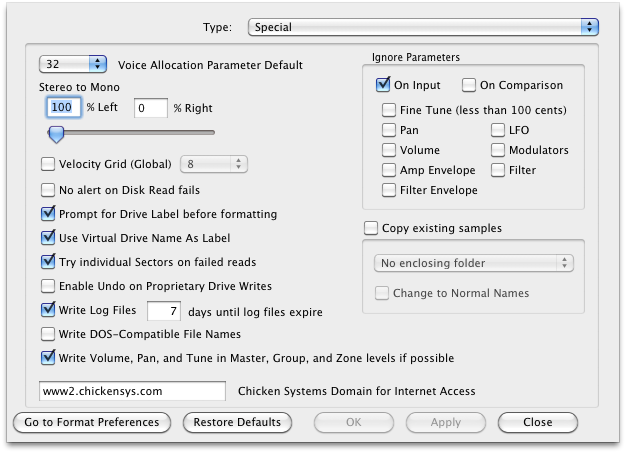
Many samplers have a "number of Voices" parameter, and often the incoming format doesn't specify this. This is the default setting in case the incoming format doesn't provide it.
Default: 32
Stereo to Mono
Whenever Translator converts a stereo file to a single mono file (destructive), this is the ratio it uses to take data from the left and right channels.
Default: 100% Left, 0% Right
Velocity Grid (Global)
This is a global setting for all formats that use Velocity Grid.
Default: Unchecked, 8
No alert on Disk Read Fails
It’s not unusual when you are making a Virtual Drive out of a CD or hard drive that there will be disk errors, whether the fault of disk or reader. Usually Translator alerts you when there’s an error when the error happens. This option turns that notification off, until the end of reading the disk.
Default: Checked
Try individual Sectors on failed reads
Translator reads disks and CD in about 128-sector chunks. If it receives an error, checking this option tells Translator to try each sector to try to retrieve as much data as it can. A sector is 2048 bytes (CD) or more normally 512 bytes.
Default: Checked
Prompt for Drive Label when formatting
Ensoniq and Roland disks or Virtual Drives have a "label" on them, like Mac or Windows drives or volumes do. (Akai, Kurzweil, and Emu do not.) Whenever you are creating a new Ensoniq or Roland disk or volume, this option puts up a prompt on what label you want, instead of taking the option out of the respective Format Option for that format.
Default: Unchecked
Use Virtual Drive Name As Label
Default: Checked
Write Log Files / Expiration in Days
Translator writes a log for every session, for debugging and analysis purposes. This disables or enables this function, plus gives a expiration time so your Logs folder does not get too filled up.
Default: Checked, 7
Write DOS-Compatible File Names
On the Mac, you don't have many limitations on how you can name things. But Windows does, so if you are interested in portability - using your stuff on non-Mac computers or drives, check this option. It insures that new files stay within the standard FAT/NTFS file system naming - no leading spaces, certain characters not allowed, etc.
Default: Unchecked
Write Volume, Pan, and Tune in Master, Group, and Zone levels if possible
It is common for an incoming format to have tuning adjustments on all three common levels - Master, Group, and Zone. If your destination format allows separating of these adjustments, checking this will write them to the appropriate location instead of summing them and applying them on the sample level.
Default: Checked
Ignore Parameters
The best formats have as little sharing forced on you as possible; if you want every sample to have it's own complete set of parameters, you can do so. But many formats force/encourage some type of parameter sharing, so when certain samples may conflict in which setting to share, this set of options tells Translator what to consider or ignore to resolve the conflict. Think of these as sort of coarser control of Parameter Tolerance, only it is a on/off sort of thing.
All Defaults: Unchecked
Copy Existing Samples
This follows up on the Copy Samples option on the Master Translation Dialog.
Default: empty