
|
WavePlayer Preferences |
Save Prompt After Playback
After the wave has stopped playing, a Save As... common dialog will appear, asking you to save the waveform as some format and ask you where you want to save it.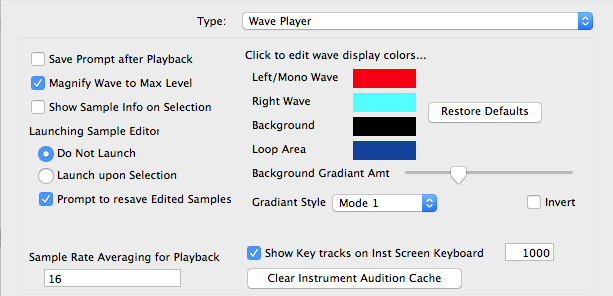
Default: Unchecked
Magnify Wave to Maximum Level
This displays the wave at maximum level, so low-level waves appear with visual accuracy.
Default: Checked
Show Sample Info on Selection
When you select a sample to show in the WavePlayer, an additional floating dialog with appear, showing you the basic parameters of the sample.
Default: Unchecked
Launching Sample Editor
The sample editor you have selected in Options-General can be manually or automatically launched when you select a sample.
Sample Rate Averaging for Playback
When a sample is near SampleRate of 44100Hz or 48000Hz, Translator will round it to that common rate. This amount is the margin of error taken, in Hertz.
Default: 16
Colors
Select your own custom colors in the WavePlayer by double-clicking on the color in question.
Gradient Amt / Style / Invert
The Background color is subject to a gradient so it looks cool. This slider sets the amount of the gradient, Style sets the direction, and the Invert check box allows you to invert it.