
|
Single Sample Map Preferences |
This panel is for when you are building an Instrument from scratch. (See Bulk Export for more information.)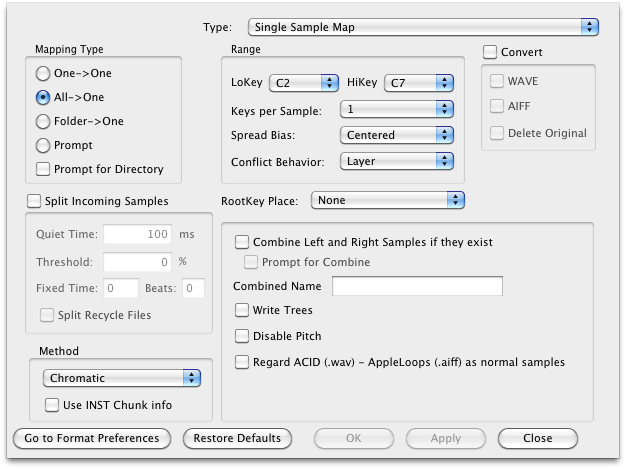
Mapping Type
If Conflict...
When Translator tries to map a sample into an area it has already ampped a sample, these options determine what it does.
Split Incoming Samples
This is a handy feature where Translator will analyze samples coming in and split them up given a certain amount of silence, THEN maps them. So if you have a single WAVE file, with say 24 separate single sounds on them separated by silence, Translator will split them to 24 individual samples and then map them across the keyboard.
Default: Unchecked
Range
Root Key Place
So, once mapped, how are you going to
set the Root Key? Checking this enables either checking the embedded value in the sample, if there is one, or looks for a root key (like C#3) in the name. Unchecking this entire option means the root key will be set to the LoKey of the sample.
Default: Checked
Method
This is the method in which the sample is mapped.
Combine Left and Right Samples, Prompt
If there is a -L and a -R sample to be considered, combines them. Only operational if the destination format handles single object Stereo samples. The Prompt option allows you to do this on a case by case basis.
Default: Checked
Combined Name
This is the name that your combined files will take on, plus a digit tacked on afterwards if necessary.
Default: Combined
Write Trees
Default: Checked
Set as "Disable Pitch"
Sets KeyTracking to 0% for that sample, on the destination format.
Default: Unchecked
Consider ACID-AppleLoops as normal samples
If NOT checked, Translator will split up WAVE files that are ACID files (if they have the ACID chunk) or AIFF files that are AppleLoops. Checking this option turns off Translator's checking for these files.
Default: Unchecked
Convert
In the case you want to convert the source files into a single type of format; for example if you have WAVE, AIFF, and other types of files, and you only want WAVE files.
Default: checked