
|
Destination Locations Preferences |
Format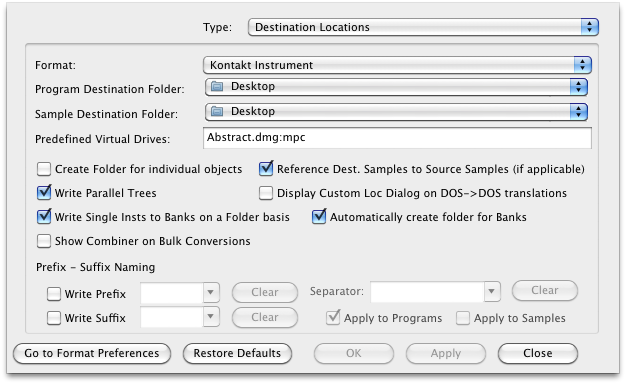 : Program Destination Folder, Sample Destination Folder
This is the default that is referred to in the Master Translation Dialog for Preset Locations. Each format you select here has it's own set of default locations for their Programs and Samples, if they apply.
Create Folder for individual objects
Default: Unchecked
Write Parallel Trees
Default: Unchecked
Write Single Instruments to Banks on a Folder basis
When converting in bulk, and the destination is a Bank-type of object, Translator will automatically convert all indicated Instruments within a Folder into that one single Bank, instead of converting each Instrument into a single Bank.
Default: Unchecked
Show Combiner on Bulk Conversions
Default: Unchecked
Reference Destination Samples to Source Samples (if applicable)
Default: Unchecked
Display Custom Locations Dialog on DOS->DOS translations
Default: Unchecked
Prefix - Suffix Naming
Translator can write a pre-ordained prefix string or suffix string to any Program or Sample that it amakes.
Write Prefix, Write Suffix
When checked, it writes the prefix or suffix listed in the adjoining box.
Separator
Applies a separator string after a prefix or before a suffix.
Apply to Programs, Samples
Applies the separator to programs and/or samples.