
|
Audio/MIDI Preferences |
These are the standard Audio and MIDI settings for the Waveplayer. The Instrument Player uses other means; always CoreAudio on Mac, and always ASIO4ALL on Windows. This is a current limitation but will change in future versions.
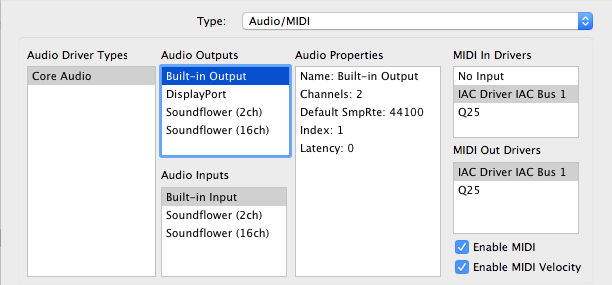 Audio Driver Types
These are the Sound Driver types on your system. Selecting one shows the Audio Outputs and Audio Inputs on the lists to the right.
Audio Outputs
These are the outputs on your system for the selected Audio Driver Type. Selecting one selects the audio output for your app.
Audio Inputs
These are the inputs on your system for the selected Audio Driver Type. Selecting one selects the audio input for your app.
Audio Properties
Shows the Properties of the Output or Input that is selected on the left.
MIDI In Drivers
Allows you to select the current MIDI In driver that will drive the player in Translator™.
MIDI Out Drivers
Allows you to select the current MIDI Out driver that your application will send MIDI out from.
Enable MIDI
Enables MIDI communication. (Does not have any effect in Free version.)
Enable MIDI Velocity
When unchecked, all MIDI notes coming in will be 127 in value.