August 24th, 2007 - A common problem with sampler files is that you can lose your sample references very easily.
Did you ever have this happen to you? You open up your sampler, you load an instrument, and it says "ca't find this sample"?
This happens for various reasons; one mainly that you moved your sample files to another drive or location.
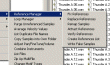
Translator has a great series of functions in it's Reference Manager. These functions allow you to repair or edit those sample links, within all the formats we support. Just select a bunch of files and say "go ahead and fix any bad sample references."
The most common function is Fix References. Once started, Fix References looks at each Instrument file and checks for the existence of the samples it refers to. If it does find one, it asks you to "create a catalog"; which means "find the folder or area your sample files are in." It then compiles that catalog and fixes the references based on that list.
Fix References goes further then any tools modern samplers give you. For instance, it looks for variations of extension or type - for instance, if your Instrument references a sample file called "brass.wav" and it actually is "brass.aif", it will include that and fix it with that file.
Fix References also can update the loop, root key, and other information in your Instrument files automatically. THis is important, since most sampler engines treat the Instrument information as authoritative, not the infromation in the samples. For EXS24, all the information is updated since that sampler requires much more information then normal.
Plus, Fix References is incredibly fast. You can fix thousands of files in one mouse click.
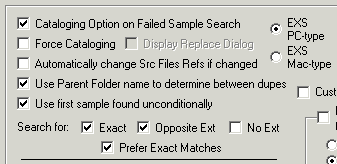
Below is a screen shot of the different options that control this function.
Fix References has several sister functions:
Replace References: Allows you to perform a search-and-replace on your references. For example, if you have samples called "Trumpet A C4.wav" and "Trumpet A E4.wav" etc., and you want to replace them with new samples called "Trumpet B C4" etc. you can do this automatically.
Attract References: The converse of Fix References; instead of changing the sample references, it copies or moves the sample files to the location the Instrument expects them to be.
Verify References: Same as Fix References, except it doesn't fix anything but lets you know if all your references are valid.
Here's a list of formats that the Reference Manager supports:
- Native Instruments Kontakt
- EXS24
- HALion
- Native Instruments Battery
- MachFive
- PropellerHeads Reason
- Cakewalk/RGCAudio SFZ
- FXPansion DR-008
- Native Instruments Reaktor
- Akai S-5000/Z-Series
|