|
Ensoniq EPS, ASR, ASR-X, Mirage Format Information |
Ensoniq EPS, EPS 16-Plus, and ASR-10 Samplers 
History EPS means Ensoniq Performance Sampler, and to this day it is noted for that role. It has an easy to use sequencer, simple disk operating scheme, and the ability to load and play at the same time. Two incredible innovations that inspired major features today were Patch Selects and Release Triggering. Patch Selects allow accessing different sets of samples just by the momentary touch of a front panel button. Release Trigger allowed triggering a sample with the key off, not just the key on. Although these days those features are common, back then it was unheard of. In 1990, Ensoniq upgraded the design to full 16-bit and added digital effects in the EPS 16-Plus. The 16-Plus added better compatibility for SCSI drives, plus as an optional accessory offered Flashbank, the ability to store Instruments on 1mb flash memory, not only allowing loading-free operation but the ability to boot up with an external disk to be used. Ensoniq capped off the series with the ASR-10 (1992), adding SIMM memory up to 16mb, stereo sampling, and the ability to record audio tracks with the sequencer directly to SCSI Drive.
Ensoniq samplers remain the most underrated sampler platform of the day. Personally, if I had to have one sampler to work with on a desert island, it would be an ASR-10 keyboard. No other sampler can do everything as well as the ASR-10. Effects. 5 stage envelopes. Great sequencer. Great sound. Ease of use. Intuitive storage system. Many looping algorithms. Fractional loop points. And on and on. Synthesis and File Structure You can have 8 Instruments loaded in the sampler at one time. The only sound file format is the Instrument, which contains all the parameters and the wavedata needed. Banks are auto-loaders of Instruments, plus a Song, plus a Bank Effect which overrides the Instrument effect and uses that effect for ALL the 8 Instruments in memory. You can attach an Effect to an Instrument, but Effects can be their own files so you can distribute them. The EPS/ASR uses a proprietary disk format, either on floppy or SCSI Drive. A computer cannot read or write this format but Chicken Systems apps can. Ensoniq's can access any capacity SCSI Drive but can only format and access up to 8GB. It is a nested folder structure, with a limit of 38 files per folder and approximately 6-9 nestings. Folders are called Directories on the Ensoniq. The files are numbered from 1-38. SCSI Drives can use a feature called Direct Macro's, which allow navigated the nested folder structure easily, by a 4 digit code. The first number is the file number (1-9) of the first Directory, the second number is the file number (1-9) of the Directory inside that Directory, and the 3rd and fourth digits is the file number (1-38) of the file to navigate to. |
|
| Please see the Format Preferences-Ensoniq section in this document for information on the different options you can set for Ensoniq import and export abilities. | |
Translating Into Ensoniq EPS/ASR Format You can write to media such as a ZipDisk or CF/SD card using USB, then shuttle that media to a SCSI-style mechanism for use on your Ensoniq. You can convert Instruments into .EFE or .EFA files that exist on your computer, but to be read by the Ensoniq, eventually they must be written to Ensoniq-formatted media. Please remember that to access floppy disks, you must be on Windows, preferably a 32-bit operating system and XP, using an internal floppy drive, and you must have the OmniFlop driver installed correctly. To convert to a CD, create a Virtual Drive first, write your files into that, then burn that to a CD. On the Mac, Translator can do this on it's own; on Windows, you need to use your favorite burning software. Remember you are burning the Virtual Drive AS the CD, not as a file on the CD. Sample names are maximum 12-characters in length and are UPPERCASE only. Spaces are allowed with a couple other special characters, some non-DOS compatible. Each EPS/ASR sample carries with it a full set of real-time parameters. The only parameters that are not sample-level are poly/mono and note on/note off triggering, which are done on the Layer level. An Ensoniq Instrument has a limited structure - only 127 mono samples - and memory capacity, which is 16mb if you are using a fully-loaded ASR-10, and only 2mb for an EPS/16-PLUS. Keep that in mind when you are converting things over. If you exceed this, the samples over capacity will not be translated. Stereo samples are done via two mono samples. All samples are converted into 16-bit. The EPS/ASR supports rule-based parameters via the Patch Selects (keyswitches and controller-switches are converted into Patch Selects), and release-triggers are supported as well. There is an 8 Layer limitation and the Patch Selects use the Layers as what is selectable or not (not the wavesamples). |
Translating Out of Ensoniq EPS/ASR Format Floppies are supported, but only on Windows and with the OmniFlop driver (with it's limitations). Remember you can always make images on another computer, then move them over to your Chicken Systems computer. The Instrument Unit on the Ensoniq is an Instrument. Samples will be converted out of the proprietary Ensoniq format and converted into the destination format. Effects, if programmed, will only be translated to formats that support those effects and can approximate them adequately. The Ensoniq uses multi-stage envelopes and will be converted to the best of ability; if the destination is only AHDSR, it dithers down to that. The Ensoniq uses two Filters in serial, and both are converted if the destination allows it. Otherwise an approximation of both in-effect is calculated. Samples are 16-bit and are converted as that unless the destination requires something different. |
Ensoniq ASR-X Drum Machine Sampler
History However, the one area of sampling that grew in that time period was beatboxes such as the Akai MPC. Ensoniq finally decided to take their MR sound engine and stuff it into a square metal box (the beatbox thing) and they called it the ASR-X. The first release had what the MR/ZR lacked, that is, the multisampling that something needs to be called a "sampler". Even better than the MPC was that it was designed to deal with chromatic instruments, not just one-shot percussion things.
And, in a unprecedented move, Ensoniq engineers looked forward and did NOT make all the parameters available through the interface but only through says using a computer editor. This was appealing because it did not make the unit overly complex to use. A plugin to the Unisyn editor by MOTU was used, followed by the more comprehensive ASR-X Tools by Rubber Chicken Software. Ensoniq then improved on the ASR-X by making a slightly improved model the ASR-X Pro. It upped the memory to 66mb, added a drum resynthesis feature, and put the OS updating from disk (not a chip update like the "black box" ASR-X). Although it had a couple memory issues, it still was a success. Nowadays you find more ASR-X Pro's than ASR-X's. Then the history went south. Shortly after the release of the ASR-X, Creative purchased Ensoniq for $77 million (mostly for the soundcard technology). Ensoniq stayed in Malvern, and since Creative already owned Emu, the merged the brands, calling the new company Emu-Ensoniq. That should have been a good thing, but soon after Creative decided to shut Malvern down and ordered all employees and assets moved to the West Coast. Most employees left the company at that point. Emu made a few ASR-X Pro's at the factory in Scotts Valley, and even announced a new OS version 4.0 that would import SoundFonts, slice beats, plus a couple other things. However, their interest was tepid - it wasn't their design, so production ceased soon afterwards and version 4.0 was never released, although there have been some beta copies available underground. Only one thing really poorly marked the ASR-X - it was underpowered with their choice of CPU. The ASR-X is capable of great things but you can't make it do too much or you start getting some latency - in playing and in the sequencer. Otherwise it likely would have the same legacy as the MPC's - and it does a have a good reputation, but people know not to push the unit. Synthesis and File Structure 1-SOUND's, stored as .SOU files, have a couple different variations that the user probably doesn't know about. The basic 1-SOUND is a Program, which contain 16 "layers" - that is, sample references - to play over the pads and velocities. Each layer can have it's own keyrange and velocity range. The next step up is a RAM-Kit, where there are 61 Programs in one .SOU file, so each key gets it's own Program. Lastly, when you import a EPS/ASR sound in, you get a 1-SOUND with any amount of "layers", but the "layers" aren't layers - there is a MAP chunk that defines what the keymaps looks like (in fact, just like the Layers are in the EPS/ASR). Files are stored in a fixed manner, with the 1-SOUND's, banks, sessions, sequences, and samples going into individual named folders. Samples go into a folder called WAVES, the 1-SOUND's go into a folder called SOUNDS. .SOU files in the SOUNDS folder can only access AIFF files in the WAVES folder. |
|
| Please see the Format Preferences-Ensoniq section in this document for information on the different options you can set for Ensoniq import and export abilities. | |
Translating Into Ensoniq ASR-X Format There will be 1 .SOU file for every Instrument Unit you convert. Samples are stored in their own WAVES folder. To play the results in your ASR-X, simply copy the SOUNDS folder and WAVES folder onto a disk, then navigate to that with your ASR-X. Keep in mind that you only have 34mb or 66mb to handle, and also stereo samples on saved as two files (left and right). Effects programmed in the source format are converted into a similar algorithm in the ASR-X, it may not match. Sample names are maximum 16-characters in length. file names are the old DOS 8.3 - with no spaces or extra characters. |
Translating or Building to Ensoniq ASR-X Format Navigate to any SOUNDS folder and convert the .SOU files you elect to convert. Keep in mind that not every .SOU file will access samples - some may only access the internal ROM sounds in the ASR-X. If you are converting to a format that can access AIFF files, the app will NOT use the ASR-X's AIFF files. This is because of a bug in the ASR-X in writing the sample rate on these files. Since the ASR-X only played back at the 44.1k sampling rate, it didn't seem to matter what the sampling rate of the file was. BUt played back on other machines, the pitch would be off. So the app writes new ones, writes the correct sampling rate (44100) so they will be usable. |
Ensoniq Mirage
History
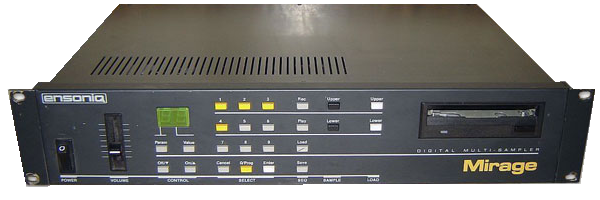
Since so much of the Mirage was based on off-the-shelf components (other than the main sound-producing chip, since Ensoniq was it's own chip foundry), innovative users - obviously enticed by it's low cost - created third-party operating systems which did different things, such as adding MIDI volume control or specific synthesis functionality. One hardware accessory the Mirage sported was the Input Sampling Filter which allowed sampling at higher sampling rates (50kHz). The irony of this was that the higher the sampling rate, the less sampling time there was. But back in that day, the premium was sound quality, not sound quantity. So depending on the need, 1sec time of 50kHz quality beat 2.2sec of 34kHz quality. Nowadays, people use a Mirage for the lo-fi sound so higher sampling rates aren't interesting anymore. Interestingly, the Mirage was only accidentally Ensoniq's first product. Their intention was to release a "synthesizer" (what we would call a ROMpler) first, but due to technical difficulties, they released the sampler first. That ROMpler was eventually released - the multitimbral ESQ-1 - and sported an equally innovative 8-track sequencer and a relatively large phosphorescent display. Although it was only 8-bit, most people never imagined that it was just a Super Preset Mirage without the sampling. The ESQ-1 was followed up with the SQ-80, which was an improved ESQ-1 with extra waveforms (the "crosswaves"), more sequencer memory, the polyphonic aftertouch keyboard that would go on their EPS/ASR/TS series), and a cleaned up OS. After that, that was the end of the Mirage-class musical instruments. (Wasn't there a soundcard version?) The EPS and EPS 16-PLUS (not the ASR-10) has a conversion utility that loads sounds from Mirage disks. However, the Conversion Engine's process has marked improvements on this process. And, lastly no discussion of the Mirage would be complete without mention of the Transoniq Hacker. One day a husband-wife team in Portland Oregon decided to start a User Group type of magazine for Ensoniq instruments. Interestingly, this duo - Eric Geislinger and Jane Talisman - got the idea because Eric brought home a Mirage and got his wife Jane, a classical piano teacher, to figure it out. Neither Eric or Jane wrote for the magazine, but they had the genius to get a couple writers to get off the ground, but the really coup-de-grace was getting Ensoniq's cooperation to include a free copy in everything Ensoniq sold. The Transoniq Hacker got fantastically popular with many innovative writers and reviewers. It had honest reviews and classified ads and print ads. 173 monthly issues were printed, starting in July 1985 until Nov 1999. Read the last issue for the eye-watering goodbye article by Jane. Synthesis and File Structure Each floppy disk held 3 sets of LOWER and UPPER sounds, and you could load one of three LOWER/UPPER sets at a time. Interestingly, at the beginning these were Single Sided / Double Density 3.5 floppies (thank God they were the 5.25 floppies the Emulator II had). SS/DD floppies has a hasty end, but DS/DD's worked as well - just one side of the platter was used. Another limitation is that each set of 65536 is divided into 256 256-sample segments. So every Wavesample is defined in 256-sample granular sections. This can produce some wasted space. Even worse, loops have to be defined on 256-sample boundaries. The Conversion Engine takes this into account and tries to line things up on 256-sample sections. Since the Mirage only had a 2-digit display, there was no concept of naming anywhere on the platform, aside from what you wrote on the floppy disk label. Synthesis-wise, the Mirage was quite capable. The digital VLSI revolution hadn't hit yet, so the Mirage had analog discrete circuitry and of course analog resonant filters. Each voice had 2 oscillators which allowed (optionally) two velocity splits or a layer. (Layering cut polyphony by half, of course.) Each SOUND (meaning LOWER or UPPER) had 8 areas called Wavesamples which addressed the 64k of sample memory, so you could (although the lack of memory worked against you) have a 16-sample multisample to play at one time. The Mirage also featured a cool way to incorporate Vel-Volume sensitivity. Instead of just have a single parameter that linked the MIDI velocity value to the output volume, instead it had two sets of envelope points, and the velocity would differentiate between the low and the high. Each point had it's own difference. This did the same thing, but you could have velocity modulate the initial attack and not the sustain, or vis-versa, or both. Setting the low and high points the same would effectively turn off velocity sensitivity. This feature carried on to the EPS/ASR series. Although the EPS/ASR series were way way more capable than the Mirage, they were digital animals and didn't carry on the analogy tradition the Mirage upheld. |
|
| Please see the Format Preferences-Ensoniq section in this document for information on the different options you can set for Ensoniq import and export abilities. | |
Translating Into Ensoniq Mirage Format Each Instrument Unit will result in 1 "SOUND"; that is, a LOWER and a UPPER sound. The Conversion Engine makes no distinction between LOWER and UPPER, so if a single sample comes in, it actually is written twice just to give UPPER something to do. A Floppy Image file will be created with the other 2 "Sounds" having default information. If multiple Instruments are coming in via a Bank, the other 2 "Sounds" on the resultant Floppy Image file will be taken advantage of, plus multiple Floppy Images will be created. All incoming data will go through our proprietary AIR (Automatic Instrument Reduction) technology in order to slash-and-burn the sample data down to where it can fit in the 65536/131072 sample limit. This includes sample rate reduction, and the default sample rate for the Mirage is 29411Hz. It will push this down even more depending on your Format Preferences-Ensoniq. Please give the AIR technology a lot of grace when it comes to creating Mirage sounds, 131072 is not a lot of data to reproduce from what you will typically give it. Since the Mirage does not support any naming, we have created a technology that will at least allow you to name things on the disk on the computer so every floppy image won't have just the name of the file to describe what's on the disk. A .NAME file with the same name as the Floppy Image will accompany each Floppy Image, and allows each Sound and every Wavesample to be named. The .NAME file will be populated upon the translation. |
Translating out of Ensoniq Mirage Format Just deal with the Floppy Image file and convert anything you want out of it. Sample Data will not stay in 8-bit format unless it has to; it is upgraded to 16-bit. We do not translate like the EPS Mirage Conversion does; there are no phony or orphaned samples. If a sample means something, we convert it, if it is blank, it is not converted. So a Mirage->EPS/ASR conversion is much cleaner and better organized. Root Key is calculated based on tuning away from MIDI note 57 (A3 when Middle C = 60), which is always the unity note on the Mirage. If a .NAME file accompanies the Floppy Image, those names will be used in the new converted Instruments. If not, a naming scheme similar to "Sample 1" combined with the name of the Floppy Image file will be used. |

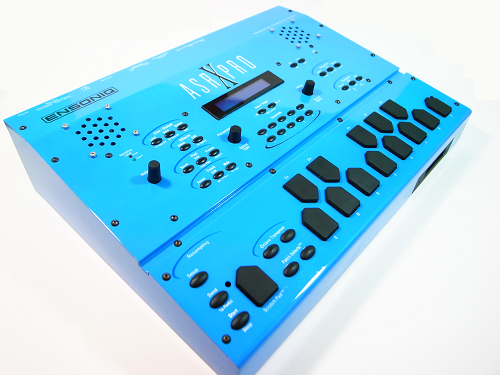 The ASR-X had a lot of what Ensoniq was refining and redefining in the 1900's - the effects were great and innovative and integrated. The pads on the box felt good. The memory was over twice of what the ASR-10 had - 33mb - but still that was the industry standard for a long time. The OS was on a chip and you didn't have to boot off disk. It used a computer-compatible disk format and used AIFF files to store samples. The sound engine and sequencer were even more tightly integrated than past Ensoniq products. It also carried the great Ensoniq Patch Select institution. The ASR-X soon read the EPS/ASR disks and imported their sounds.