
|
Ensoniq Preferences |
Type
Determines what specific Instrument Type a newly-created EPS/ASR Instrument is. The EPS and ASR-10 formats are almost identical, but what essentially makes them different is the type of effect they contain. This option parameter dictates what type of file, and thus what effect type, is created when translating into Ensoniq.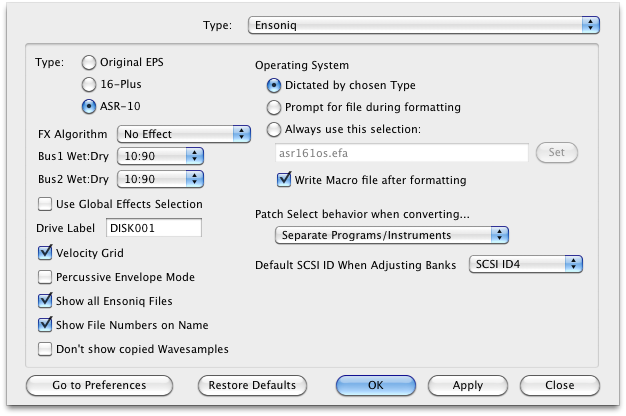
Default: ASR-10
Effects Algorithm / Wet:Dry
Determines the default effect type that goes into all newly-created Instruments, the Wet/Dry balances it'll have, and if it it takes the value or uses the Global Effects option (in Options-General).
Drive Label
This is the Drive Label that is written by default to a drive when you format it with Translator, when the Prompt for Drive Label is checked in the Options-General Tab.
Default: "TLR 001"
Velocity Grid
This option lines up Velocity values so the line up on a grid, so they aren't all over the place - sometimes older Programs have them shifted around so they overlap or become incongruous by mistake.
Percussive Envelope Mode
An EPS/ASR Instrument is unique in that it has a Initial Level part to their envelopes, that comes before the Attack Time. The wrinkle here is that there is a sound difference if the Initial Level is 0 and Attack Time is 0, compared to when the Initial Level is 100% and the Attack Time is 0. Checking this option guarantees the Initial Level is always 100%.
Default: Unchecked
Show all Ensoniq Files, not just Instruments and Directories
Translator can be used for simply moving files around, not just as a Translator. This option enables non-Instrument files on an Ensoniq disk, such as Songs, Banks, Effects, etc., to be shown so you can move them around.
Default: Unchecked
Do not show copied Wavesamples
Sometimes you don't care about viewing copied Wavesamples in an Ensoniq instrument; most of the time they are copied to exist in another Layer and often they are programmed the same, and almost all the time they window the same wavedata.
Default: Unchecked
Operating System
Patch Select behavior when converting...
An Ensoniq Instrument can be programmed to take advantage of the patch Select buttons, when different sets of the 8 Layers are enabled or disabled. When converting OUT of an Ensoniq Instrument, you have some choices on how those are separated in the destination format. If the destination doesn't support "dimensions", there is no issue and they are separated regardless. But if the destination DOES support dimensions, then these are the four different ways you can separate (or combine) the Patch Selects.
Default SCSI ID when Adjusting Banks
Since your computer has no real notion on SCSI ID, whereas your ENsoniq does, you need to supply the default SCSI ID that will be used when banks get written onto a Virtual Drive or an actual Ensoniq disk.