
|
Importing Samples To Pads |
The most operation of the MV Kit Creator™ is importing Samples from various locations to the Pads. There are many ways of doing this:
Dragging Samples To Pads
When you drag a sample onto a Pad, the Pad will light up and show you which Zone that dragged Sample will go in via a small red rectangle. Remember, a Pad can access up to 4 samples and it's up to you how those samples are played. Each Zone can be set to play to a certain velocity range (that is, how hard you hit the Pad or via MIDI).
Via Preferences-General, you can set up if the Zones are "lined up" on the Pad up-down, down-up, left-right, or right-left, or simply all layered.
Via Preferences-Pad, you can set up different ways of splitting up the Zones to reflect different velocity splits.
When you drop the sample, the Main Screen will be updated with the new sample and will play on that Pad.
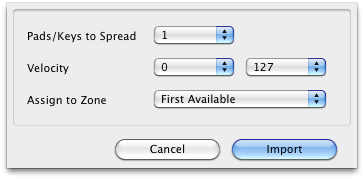
| Import Spread If you drag multiple samples, pressing the CTL key displays the Import Spread dialog as you drop your samples. You can choose how your samples are spread out across the pads. This is very handy for Chromatic Instruments. |
 |
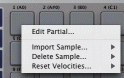
| Using Right-Click Import Menus If you right-click on a Pad, you will get a Import menu for every Zone. Viewing the sub-menu under each shows Browse.. and the entry points of the Sound Database. Selecting Browse... opens a Open dialog allowing you to choose an external WAVE or AIFF to import. (Note you cannot import .mv0-samples this way.) |
 |
Importing .mv0-based Samples
Once you've worked with MV Kit Creator for awhile, many of your samples will reside in .mv0 files rather then existing in external WAVE or AIFF files. You can access these files in two ways: via the Sound Database or by simply loading in a .mv0 file into the current Project.
However, remember that once samples are in .mv0 format, they are 16-bit only; any 24-bit resolution will be lost. Sample Rates are retained.
| MV Kit Creator™ LE Limitations: You can import samples using Browse... and by dropping samples from outside the interface, but you cannot import from your database. |