 If you want a computer-based Program/Instrument Builder for your sampler and one has previously never been made available to you, you NEED Constructor™ ! If you want a computer-based Program/Instrument Builder for your sampler and one has previously never been made available to you, you NEED Constructor™ !
Constructor™ is remarkably easy to use. A Document represents an Instrument. You can start off with a new "blank slate" or open an existing Instrument - for example, a Kontakt .nki, a Structure patch, a GigaStudio instrument, a Roland Patch/Emu Bank/Ensoniq Instrument, or anything else - and improve on that.
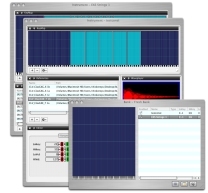
You can add or delete samples using the graphical KeyMap View, or edit the real-time parameters using the Parameter Editor. Constructor™ also introduces the concept of View Groups. They allow you to see a section of your Instrument based on your criteria, and hides the rest. This is invaluable for allowing you to work on a portion of your Instrument without being concerned about the rest. View Groups also offer a means to organize your Instrument for your destination formats needs. You can make as many View Groups as you'd like; they are saved in a Project File for that Instrument, so you can pick up where you left off, even after you've saved the file in a destination format.
Constructor™ isn't just for professional Instrument designers - it's for everyone who wants to make even elementary edits to their instruments, or wants to set new Instruments up in their own personal way.
Constructor™ introduces the concept of Banks, where you can take as many Instruments as you like and arrange them in an infinite amount of possibilities. You can make a collection of Instruments and save them as one SoundFont or GigaStudio file or Motif All Voice, for instance, but that's not all. You can merge several Instruments into one Instrument, using your own Rule criteria, allowing custom split/layer programs without sacrificing the original Instrument. Even better, this process is so easy it can take as little as 10-20 seconds!
One of Constructor™'s design goals was logical workflow and ease of use. Despite it's power, theres no detail clutter or top-level technologies you'll rarely use. The Instrument Document is user-designable - save your favorite Document designs, not forcing factory-designed editing areas like most editing envvironments.
 Practically every sampler destination format known to man is supported - from Kontakt, to EXS24, to Emulator E4, to Ensoniq ASR-10, to Akai S-3000, and more. It is truly UNIVERSAL and not encumbered by a single base format. Nor do you only have to have a Mac to have a powerful instrument editor. Practically every sampler destination format known to man is supported - from Kontakt, to EXS24, to Emulator E4, to Ensoniq ASR-10, to Akai S-3000, and more. It is truly UNIVERSAL and not encumbered by a single base format. Nor do you only have to have a Mac to have a powerful instrument editor.
But despite the multiplicity of supported formats, Constructor™ doesn't impose this complexity on the user, hiding most of it. Constructor™ approaches "Instruments" as a generic structure, similar to what graphic editors do - once you open a Picture (no matter if it's a JPEG or PNG), once you are editing it, its just a Picture.
Constructor™ includes these additonal powerful features:
- Powerful Mapping Editor enables full or selective viewing of Instruments
- Audition Instruments fully or selectively
- Import any sample from any location, even within a Giga file or a Soundfont, for example
- Use your favorite sample editors to edit your sounds, or use the powerful onboard editing features
- Import and Export most professional formats, Hardware and Software
- Includes powerful integrated Sound Database
- Macintosh and Windows compatible
Constructor™ retails for $199.95, but for a limited time it will be available for an Introductory price of $149.95. Registered users of Translator (any edition), MV Kit Creator, and any Ensoniq Tools product can purchase Constructor™ for a special price of $99.95.
You can purchase Constructor™ at SamplerZone.com. For a list of special offers to Translator owners and other Chicken Systems products, please go to the Chicken Systems web site at this link. |