
|
Roland Preferences |
Roland Bulk Conversion
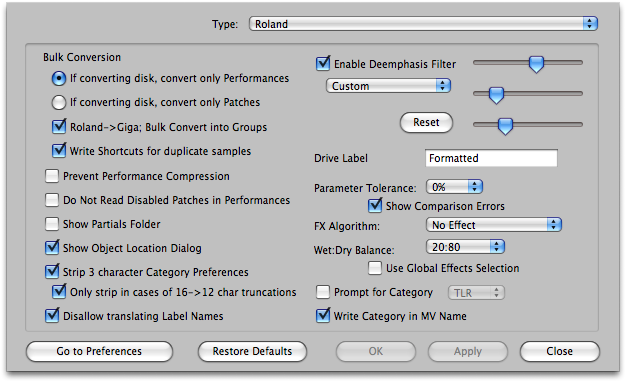
Prevent Performance Compression
Translator, unlike any other translation software, converts Roland Performances just as they are set up on the Roland. If two or more "parts" in the Performance share the same MIDI Channel, they will be combined into one conglomerate Program/Preset/Instrument. This is called Performance Compression. If you do not want this to occur, check this option.
Default: Unchecked
Do Not Read Disabled Patches In Performances
Many Performances reference more than one Patch, except enable the first one and disable the rest, with the intention that you toggle what is enabled in order to audition a range of Patches for your liking. When this is checked, these Patches are not read or converted, even into disabled states. When unchecked, the Patches are read and converted regardless of being enabled or not.
Default: Checked
Show Partials Folder
Partials are the object that Roland uses to reference samples and store a keyranges parameters. Patches use Partials in a keymap to reference samples. Partials are never intended to be played in and of themselves, so there's little use of translating them in and of themselves. Thus. there's not much reason to show them in the Translator interface. Checking this option shows the Partials folder.
Default: Checked
Strip 3-Character Category Preferences
The Roland, for the first 4 characters of an object name, lists a three character code plus a colon. If this option is checked, Translator, when exporting or importing a Roland object, will ignore the first 4 characters and simply name the object as the following 12 characters.
Default: Unchecked
Only Strip in cases of 16->12 or 8 Character Truncations
(Only enabled when "Strip" above is checked) If checked, Translator will only strip the category Prefix if it needs to truncate the name down to less than 16 characters; otherwise, it will preserve it.
Default: Checked
Disallow translating Label Names
Designers of popular Roland CD-ROM's use many "blank" objects to list categories, in order to make lists more understandable. These are real objects you would load - but they are just blank. If checked, Translator will ignore these type of objects. Unfortunately, the only way to recognize these is to look at the "ID"; that is the three characters that come before the colon (:) in the file name.
Here is the current list of ID's that are considered: "---:" "AAA::" "___:" "===:" "***:"
Default: Checked
Enable Roland Digital Emphasis Filter
Roland samplers use a special filter on input and output for their sample playback engine. Translator simulates this filter, with the standard ("Authentic") one filter included, four other preset filters, and a user-set one depending on your taste. See the Roland Emphasis/DeEmphasis article in the Miscellaneous section for specifics on these controls.
Default: checked, Authentic
Drive Label
This is the Drive Label that is written by default to a drive when you format it with Translator, when the Prompt for Drive Label is checked in the Options-General Tab.
Default: "Formatted"
Parameter Tolerance
Roland S-7x and XV-5080 share envelopes, LFO and filter settings for all the velocity ranges within a keyrange. There cannot be unique settings for every sample reference.
Thus, if incoming references require unique values, Translator is either going to write new Patches that accommodate this (and put them together as a Performance when finished), or you can use the Parameter Tolerance value (in a percent) to "tolerate" certain values and trade off complexity for the convenience of having a single Patch represent your incoming Program, rather than a unwieldy Performance.
Default: 0%
Go To Comparison Options button
Takes you to the master Comparison Options area (under Options). This is Parameter Tolerance from a different angle - on a parameter set basis, you can choose to ignore incoming values when it comes to comparisons. The Parameter Tolerance value is applied to those parameter sets that are not ignored.
Show Comparison Errors
The S-7x, XV-5080, MV-8000 Series formats are limited formats, and Translator uses many comparison averaging techniques to cram more complicated formats into their structures. This option allows a dialog to come up to allow you to manually control how these comparison averaging functions are applied. This option is handy, not just because it allows you to control the averaging, but it also tells you when a more complicated format is incoming.
Default: checked
FX Algorithm - Wet/Dry - Global Effects Selection
Determines the default effect type that goes into all newly-created Patches, the Wet/Dry balance it has, and if it takes the value or uses the Global Effects option (in Options-Effects).
Prompt for Category
Determines the category type that will go in all MV-8000 Series .mv0 files.
Write Category in MV Name
The MV has two places the category goes; one is a byte flag, the other is the name itself. This option puts the category string into the name.