|
Slice File Information |
Slice Files
A "Slice File" (our term) is a unique and inventive way to play back audio at different tempos without changing the pitch. Although nowadays pitch-changing DSP and formant-shifting is much more advanced than it used to be, it's nice to have a technique that doesn't even touch the audio; that's what slice files do.
The concept is simple. Take a rhythmic piece of audio, and place markers at the start of every energy burst; that is, when a kick drum hits, or a snare drum cracks, etc. Let's say the audio is a drum beat that lasts 4 bars, at 4/4, at 120bpm. Basically a slice player plays each "slice"; that is, the audio starting at a marker and lasting until the next marker, at the time it is supposed to be played depending on the new tempo setting. In our example, if the new tempo setting is 120bpm, then each slice gets played right at it's original place. But if the new tempo is faster, than the slice player fades out or "smudges" the end of the audio before the next slice is to be played, since the new slice starts playing before the current slices gets done playing at faster tempos. For slower tempos, there can be gaps in the audio, although some slice players synthesize audio to fill the gaps in. Good loop designers try to do their original loop audio at as slow a tempo as possible, because slower tempo playback is much more problematic than faster loop playback.
There are several slice file formats, but there isn't anything special about them that distinguish them form each other. All are the same things: a piece of audio with markers that determine when the energy bursts (called transients) occur, in order for a slice player to play it back accurately.
Before this article talks about the different slice file formats and their histories, it is critical to talk about how slice files are created, mainly because if it is desired to convert non-sliced things into sliced formats, one must understand about beat-slicing.
Beat-slicing; that is, determining where the markers are placed, is a black art. Every piece of audio is different - some transients are low-frequency energy, some are high-frequency, some are important in the grand scheme of the clip, some aren't. That's why you don't find many (if at all, except in Translator) bulk import functions of beat-slicing, because ultimately you have to do it one-by-one.
To make this clear, lets take the Recycle application by Propellerheads for an example. You open up Recycle and open a plain WAVE file of, lets say a mildly tame drum beat. It's almost like magic - Recycle runs its beat-detection algorithm and you can see the bumps in the audio waveform and the lines going right at the start of the bumps. But as you can see, the bumps are pretty obviously detectable - I mean, YOU see them. No editing is needed, just save it as a Recycle file and you are done.
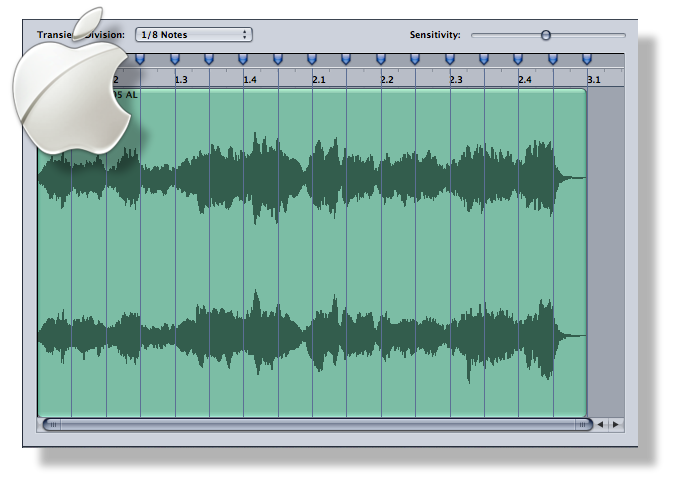
But if you take a busy rhythmic loop with less low-frequency energy and lots of subtle bursts, the markers tend to be more jumbled and it may miss an important energy burst. Then, you take Recycle's Sensitivity slider and run it up or down, so you are comfortable with not too little or not too many markers. Perhaps you may want to adjust the fadein/fadeout envelope to get rid of some of the ticking/clicking at the marker points. Then you save it.
So if you have 1000 WAVE files that you want to import into Stylus RMX, Translator lets you do this but remember it's not as easy as a click of a mouse. You have to make sure your Beat Detection settings (in Options-Data Processing)are set properly, and then you should listen to your results in RMX to see if they are okay.
Converting one slice file to another is MUCH easier, you already have the slice information predetermined in the source file.
It should be strongly noted that Translator CANNOT convert into Recycle 2 format. Propellerheads, in their short-sighted view, encrypted the format so no one can create a Recycle 2 file (which can be stereo or 24-bit) except with the Recycle application. Translator can create Recycle 1 files, but these are limited to mono and can be no more than 16-bit. However, since ACID and AppleLoops are no different than Recycle files, we strongly recommend using those formats and not Recycle. Proprietary formats should be avoided when there are public and editable formats available.
Lastly, since (we repeat) ALL SLICE FILE FORMATS ARE THE SAME there should be no credence given to the view that "Recycle files are better than ACID files" or similar. It may be true that the majority of Recycle files are created with more care than ACID files, and some of that may be due to the Recycle application itself, but there is no reason you can't have good ACID files and good AppleLoop files. There is nothing inherent in the format that make sit good or not.
Propellerheads Recycle 
History
Since the Recycle app was not designed to play them back in performance, Propellerheads created the Shared Library, which is a code library publicly available so other applications can playback Recycle files on their own. Propellerheads makes their money on the app itself, and perhaps on selling loops they make, but they (in a sense) give away the player for free. Recycle version 2 came out and supported stereo files (amazing it didn't originally) but made the format encrypted to make sure their cash cow didn't get competed against. It took a long time the Recycle app and the Shared Library finally got 64-bit versions in 2011. Recycle is an older format but it has carried itself well. Synthesis and File Structure A Recycle file has the obligatory audio data (encrypted) and the slice markers, but also has all the envelope and preview information in the headers as well. This is so you can load the Recycle file back into the Recycle application and have the same settings. Recycle files are sometimes called "REX files" as slang because of the original file extension. |
|
Translating Into Recycle Format You may want to reconsider translating into Recycle 1 format, it is better to just convert into the actual format you actually want. Most all slice players support ACID and AppleLoops, which can be stereo and 24-bit. Use those instead. |
Translating Out of Recycle Format To Single Samples To Multisample Instruments |
Sony ACID
History
Synthesis and File Structure So, our definition of ACID files are WAVE files with two extra chunks in them; one defining beats and time signature, the other defining the markers. These files can be loaded into an existing ACID project to populate it's tracks. ACID is designed to Somewhere along the way the moniker "ACIDising WAVE files" got spread around. This is largely misunderstood phrase, but it mainly was meant to describe the process of running the sample through ACID's beat detection algorithm to achieve the markers to notate the transients. Again, the holy grail of bulk detection was desired, but people really didn't know how to ask for it, nor understood that such a thing is not as beneficial as they would think. Part of this is also made confusing by Sound Forge itself, which has a ACID properties page. This only writes the first ACID chunk, not the second (the marker chunk, the most important). OK, so let's say it: ACID files as described by us are WAVE files with the two ACID chunks in them. ACID Projects are .acd files and we do not support them. ACID 7.0+ files have a revised marker chunk to them, but they also read the older ACID marker chunk.
|
|
Translating Into ACID Format From Other Slice Formats From Single Samples If your source's ARE WAVE files, they will not be overwritten with the new file, but Translator will write a unique file name. |
Translating Out of ACID Format To Single Samples To Multisample Instruments |
History
AppleLoops also feeds Apple's SoundTrack Pro product. Synthesis and File Structure An AppleLoop is sort of a AIFF version of an ACID file, it's an AIFF file with extra chunks. Again, and it can't bear repeating, but it's what a Slice File is - a single piece of audio data with a set of markers. Part of the problem with AppleLoops is that there is not one superstar utility that creates them, like ACID or Recycle do with their native formats. The AppleLoop Utility still is the only app that creates these files, and it is so-so. It is free and has gone under several feeble incarnations. AppleLoops, due to the Utility, seems to place emphasis on the Grid; that is, the beat detection does detect "beats", but also lays out a time grid to facilitate you knowing where the actual timed beats are occurring, so you can see how the actual played ones line up. But again, once you save the AppleLoop, none of this matters. It devolves into a single audio file with markers, which is all that a slice player needs. |
|
Translating Into AppleLoops Format From Other Slice Formats From Single Samples If your source's ARE AIFF files, they will not be overwritten with the new file, but Translator will write a unique file name. |
Translating Out of AppleLoops Format To Single Samples To Multisample Instruments |
Spectrasonics Stylus RMX
History
So history would dictate that one day Spectrasonics would come out with their own Groove Player, and their first in-house software application product was just that - Stylus RMX. RMX comes loaded with a extremely large (4GB+) Core Library that provides many Loop Suites of tempo-adjustable data. Spectrasonics ended up converting inhouse all their Groove Control stuff released previously to RMX library format, selling them as Xpanders. RMX allows limited importing into their player. Since Spectrasonics historically is a sound company, their emphasis is on selling sounds, not so much hyping their player. SO importing isn't big on their list, but RMX can load in Recycle files; actually there is a separate app that converts the Recycle files to RMX format. (That's where Translator comes into play.) RMX does very well as a slice player, and that's likely an understatement - Stylus RMX was perhaps the largest selling music software app in the first decade of the 21st Century. That's not bad! Synthesis and File Structure The Core Library, the other provided libraries, and the Xpanders use .db files for their sounds. These are gigantic files (to spurn piracy) that contain XML for their marker info, and then use internal AIFF chunks with encrypted audio for their sounds. Stylus, due mostly to their Recycle import, can play a smaller format that is a .xml file with the marker information with a single file in a named folder called "audio", which is actually a simple AIFF file and nothing more. So, here's what Stylus RMX actually is - it's a multi-track slice player. A typical RMX LoopSuite is 11/22 tracks of loop-playing, playing simultaneously. It's like Groove Control on steroids, not only are the slices split up, the individual components are too. This way, the player can slide different aspects of the loop composition up to achieve a variety of groove feels. However, this is only mainly available from the Core Library and other Spectra-provided libraries. Recycle-imported RMX files are simply a single track, since there is no opportunity to separate the elements, you just don't have the same type of control. Again, remembering that the Spectrasonics is a sound company, this makes sense. An innovative company named Nine Volt Audio has come up with very creative ways to simulate or just outright make multi-track RMX files form scratch. Check them out at their website www.ninevoltaudio.com User-created Stylus RMX files goes into the User Libraries folder in what Spectroscopic calls the SAGE folder. They then show up in the RMX Browser and you can load them in from there. Each sub-folder in User LIbraries is limited to 61 Loop Suites. |
|
Translating Into Stylus RMX Format From Other Slice Formats From Single Samples The result of conversions is like this: Audio is the sound file. It's just an AIFF file in disguise. data.xml contains the markers, and the folder structure is what identifies this LoopSuite with the RMX browser. |
Translating Out of Stylus RMX Format To Other Slice Formats To Single Samples To Multisample Instruments |