
|
Creating Slice Formats - Beat Detection |
One of the very unique features of Translator is the ability to convert a single piece of audio into a “Slice File”. Slice Files are explained below, but basically they are sample files that can played back at slower or faster tempos without changing their pitch. The most popular examples are Recycle, ACID files, AppleLoops, and Stylus RMX files. There are a couple other examples also.
Important Note: Translator can convert OUT of any Slice File format - Recycle, AppleLoops, etc. However, Translator CANNOT convert INTO Recycle 2 format. This is because Propellerheads, the author of the format, has made it encrypted so no one can write one. Absolutely all programs that read them cannot do so on their own; they use what is called the Recycle Shared Library, provided by Propellerheads. This READS any Recycle file, but does not WRITE any. Translator CAN convert to Recycle 1 format, but that is mono-only.
It is for this reason we recommend as little use of Recycle files on your part as possible. ACID files and AppleLoops perform the same function without encrypting their files. Recycle is popular only because of the name and “first there” history. If you buy loop libraries, buy or use the ACID or AppleLoop variants. As long as Propellerheads encrypts their files, their format should be avoided if possible because they just make everyone's job harder. Hopefully they will change their position or including Recycle creation in the Shared Library. Until then, please sponsor the more versatile and open formats.
What Is A Slice File
A WAVE or AIFF file is simply a piece of audio data. And any “slice file”, such as a Recycle file, ACID file, AppleLoop, or Stylus RMX file, are just pieces of audio data as well.
The only difference between a regular sample file and a slice file is that a slice file has markers written in a information chunk in the file. These markers are placed strategically where transients (sharp sounds) in the file start, so a player that reads slice files knows where the slices are. This is how a Slice File can be played back at various tempos: the player plays back a slice at the position the tempo dictates. At faster tempos, the slices fade out to make way for the next slice; at slower tempos, there is a gap between the slices. (However, some players artificially add sample data to “plug the holes”. Also, good Slice Files are originally recorded at the slowest tempo reasonably allowed, so they never have to be played back at a slower tempo than their “unity tempo”.)
To create a Slice File, one has to “slice” the audio data into slices of energy (the “beats”) so the playback engine plays it back in a way that makes rhythmic sense. This requires a beat detector.
Slice editors, most notably Recycle, but also ACID itself and the AppleLoop Utility that Apple provides, have beat detection. They do 2 things: They beat-detect a sound file, plus they can play the slice files back at different tempos. They do this with the assistance of the detected markers. Once you have what you want, then you save into a slice file, where the audio stays constant but the markers are written in the file. So when a slice player reads the file, the slices are the secret to it’s capability to play them back at any tempo.
Translator 6’s Beat Detection
Translator 6 now has a Beat Detector, and thus has the ability to create Slice File, for playback on slice engines like Stylus RMX or other. This can also be done in bulk, so you can take (say) 1000 WAVE files and convert them into 1000 slice files without having to do them one at a time in (say) Propellerheads Recycle application.
To convert one or more pieces of sample data to Slice File format, simply do it like you would any other conversion. You can convert a folder of WAVE files, or another example would be to convert a Giga file full of drum beats - each sample becomes a Slice File.
It is vitally important to pay attention to the Beat Detector preferences, under Preferences-Data Processing. The defaults work for most clear and simple beats, but they definitely will not work with everything. You will need to experiment with these on a case-by-case basis, but keep trying, there usually is a solution to any rhythmic piece of data.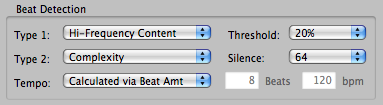
Here is the explanation of the Beat Detectors parameters:
So in contrast, converting to Slice Files is not as seamless nor as perfect as other Instrument or Sample conversions are. But this ability can make the creation a bit easier, a bit faster, and a bit more convenient.