
|
Roland Fantom Format Information |
History
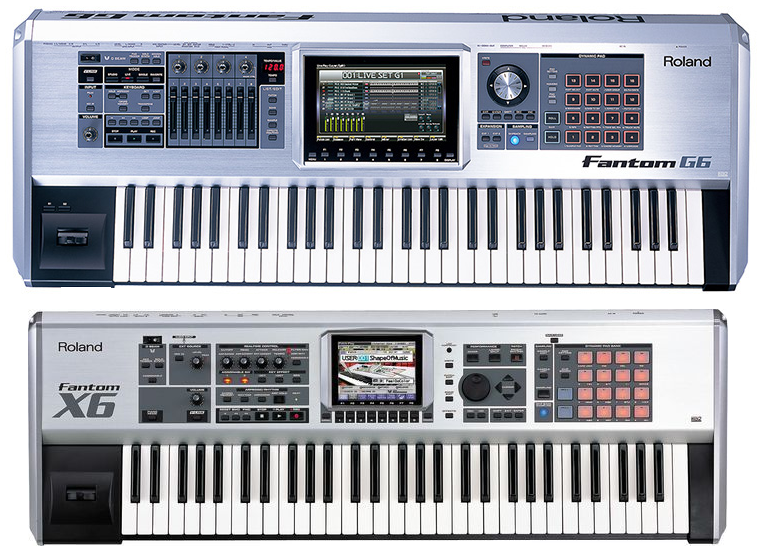
The (seemingly) final Fantom was the Fantom-G. Due to a hardware redesign, the first Fantom-G operating system did not include sample-playback. Ultimately it arrived, but it wasn't too much better than the Fantom-X implementation; in fact, the file structure was practically the same, with the exception of longer Patch names. However, we can't go on without frothing at the mouth about how sexy the BIG screen of the Fantom-G is. Beautiful. It's like a TV. Roland also derived the sample-playback to the Juno-G, which is the same as the Fantom-X (not the Fantom-G, confused yet?) with just a renamed master file. And there was a rack version of the Fantom-X made, called the Fantom-XR. It incorporates sample-playback as well, which is an edge on the Motif Rack, which curiously omitted the feature. After discontinuing the Fantom-G, Roland waited awhile until it released a new Fantom, at least one that supported user multisamples (the only thing we are interested in). They called this - surprise - Fantom, without any suffix. They also changed the names of their internal structures (confusing) and although it does support user-sample multisamples, it does it like the Fantom-G although it's not the Project paradigm but only available via the Backup/Restore mechanism. That is virtually just like the Fantom-G mechanism, but just seems a lot scarier. Synthesis and File Structure
The SMPL folder contains all the samples, usually in WAVE file format. It can use AIFF but that is rare. They are named according to number, on the S/X it is smpl001.wav..., on the G it is 0001.WAV... The samples are named internally, just not in their file names. The S/X WAVE files can be stereo, but the next number up cannot exist. As a result you get lists like smpl003.wav, then smpl005.wav, because the Fantom is counting #4 as the right side of the #3 file. The G allows for stereo files but they don't have to skip the counting. A Fantom Patch has 4 Tones, which can reference a ROM area, or a user Multisample. There can be up to 128 Multisamples in the machine at once. A Multisample is simply a 128-note-wide keymap, it does not include Velocity like the Motif Waveform does. Velocity splits are accomplished in the Tones, so with a single Patch there can only be up to 4 Velocity splits. (Making a Performance/Live Set/Studio Set can pair Patches up so you can achieve more if you want.) Multisamples also do not carry any tuning or panning or in fact any other information. This largely restricts flexibility enormously, as there is few parameters on the sample level. The Fantom has another structure called a Rhythm Kit, which are like Motif Drum Voices or Fusion Drum Programs. They simply define 4 Tones for every key, with a limited parameter set. You can assign a single sample or a Multisample to it, but the only key the Tone will care about will be that key only in the Multisample, so using a Multisample is overkill, but still it's done in complex situations. The strange thing about the Fantom-S/X is that sample data is loaded independently from the Patch data, which is simply access by putting in the media card and selecting the Patch number. SO you just have to trust that the samples you are inputting are the ones that match up to the Multisamples. Yet another strange thing about the Fantom is that there is no way, or at least any easy way, to transfer a Patch, Multisample, or Sample set to another project. It's extremely inflexible. Translator helps on this with the ability to convert into an existing Roland file structure or project. The Fantom (modern) works differently, as the FANTOM.SVD file holds not just the Patch/Multisample data, but also the samples in a monolithic way. Oh, and the terminology... it's all changed. Performances are now called Scenes. Patches are now called Tones. (What were called) Tones are now called Zones. At least Multisamples are still called Multisamples. To date, the only file type the Fantom (modern) allows to include Multisamples and Samples and Tones etc. is to Restore the entire memory off a FANTOM.SVD file that was created via a Fantom backup. That is how the Conversion Engine supports the Fantom (modern), it takes a backup file that you created and edits it by entering the Multisample information and literally appending the Samples, since FANTOM.SVD is one large monolith file. |
|
Translating and Building to Roland Fantom Format Fantom Modern Only: Due to Fantom Modern's lack of file handling, you have to jump through some hoops to get converted data into your Fantom. This was figured out by our innovative engineers.
Fantom-S/X/G Only: Samples are converted into the special Fantom WAVE file format, which is a legal WAVE file but contains certain custom chunks. The incoming structure is arranged into the proper Roland folder structure or within one that already exists. Since there are restrictions on Tone-level programming and only 4 Tones, sometimes multiple Patches must be created to imitate an incoming format. Patches like this are prefaced with an asterisk (*) and a Perf/Live/Studio Set is created, which can play multiple Patches at one time. Parameter Tolerance can be used to reduce the need for multiple Patches; higher tolerance allows the Translator conversion engine to average programming needs and while the final result will not exactly match in the incoming source, it will be less complicated to deal with. 0% Parameter Tolerance means no averaging will take place, 100% tolerance means the first claim to a parameter will apply to all further ones. You specify your particular Fantom version, plus choosing between Patch and Rhythm Kit, in the Format Preferences-Fantom dialog. |
Translating Out of Roland Fantom Format Samples will be copied out of the unique WAVE format and converted into the destination format; or in the case of the Fantom modern, extracted out of the FANTOM.SVD file. You can also convert an entire Fantom Bank into a Bank-type destination such as SoundFont, Giga, Kronos, Motif, etc. |

 The SND folder contains mainly one file; fans.svd (fangsnd.svd on the Fantom-G). This contains all the Performance (on the G they are called Live Sets or Studio Sets), Patch, and Multisample information.