
|
Roland Fantom Preferences |
Type
Determines whether incoming formats are converted into Patches or Rhythm Kits.
Default: Patch
Velocity Grid
This averages incoming velocity ranges to fit a 16-part grid (out of 128 values). For example, a velocity of 5-90 will become 0-95, and 29-120 will become 32-127. This eases the pressure on the limited Fantom format to accommodate staggered or unusual velocity ranges.
Default: checked
Do not show INIT Objects
The Fantom has no concept of "blank" Patch or Performance. Anything conceived as "blank" usually is named starting with the word "INIT". When viewing Fantom Patches/Performances, you may not want to be concerned with these objects messing up your view. Checking this option stops those objects from being seen.
Default: Checked
Warn if complex
The Fantom has a rather limited structure. It's not hard to force multiple Patches to be written if your Parameter Tolerance is highly demanding. If this option is checked, a warning will be given so you know something extreme is about to happen.
Default: Checked
Fantom Type
Determines if you are written S/X type of .svd and Fantom folder structures or Fantom-G types. (Juno-G type is the same as S/X, except that the .svd file is named fang.svd instead of fans.svd.)
Default: Fantom-S/X
Parameter Tolerance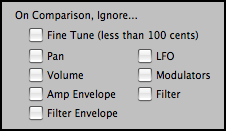
When converting INTO this format, there may be structural limitations where if you wanted to ensure all parameters were converted perfectly, you'd end up with multiple Programs/Presets being created, perhaps in more of a mess than you prefer. Setting Parameter Tolerance to a higher percentage gives some grace to these parameters so the conversion will be a little exact but you'll wind up with a cleaner organization that will be more usable to you.
Go To Comparison Options button
Takes you to the master Comparison Options area (under Options). This is Parameter Tolerance from a different angle - on a parameter set basis, you can choose to ignore incoming values when it comes to comparisons. The Parameter Tolerance value is applied to those parameter sets that are not ignored.
FX Algorithm - Wet/Dry Balance - Use Global Effects Selection
Determines the default effect type that goes into all newly-created Patches, the Wet/Dry balance it has, and if it takes the value or uses the Global Effects option (in Options-Effects).