|
Emu Emulator X, E4, E3, ESi, Emax, Emulator II Format Information |
Emu Emulator X 
History
Emu also released several Emulator X-specific libraries, and the more valuable and intense ones were copy-protected. Emu created a sound-distribution site called Emu SoundCentral where they sold these types of things. As most people know, Emu was purchased by the Singapore-based Creative Technologies in the 1990's, and Creative held on to the Emu brand for mostly pro-audio purposes. The Emu 1010 sound card was really a Creative sound card, just branded as Emu. There were Emu controller keyboards and many sound card variations. Today, the only manufactured E-mu-branded equipment is... HEADPHONES. There is the Emu Teak and the Emu Walnut. Looks rather nice. There were 3 versions of Emulator X released: 1, 2 and of course, 3. It was only Windows, not Mac, which may have something to do with the lack of longevity of the product. The interface was not something people would consider as exceptional; it was a bit slow and touchy. Some facets of it were really great eye-candy, with the blue-and-teal elements. Waveforms looked really great in it. Emu released a free version of Emulator X called (surprise) Proteus X, which looked exactly like the Emulator X except it had a orange theme to it. You couldn't edit the Presets and you couldn't view the samples. Additionally, it only played the Banks provided (of course). One really nice feature to the Emulator X was the ability to have very versatile sound templates in which to invoke instant programming without having to duplicate it many times over (carpel-tunel syndrome). Emulator X was distributed and supported by Emu for about 10 years, then support and new versions gradually and quietly disappeared in 2010's. Synthesis and File Structure A Emulator X Bank s an .EXB file, and the samples are .EBL files within a folder called "SamplePool" in the same folder as the .EXB. (When you save a Bank in Emulator X, it saves the .EXB in a parent folder with the same name, in order to isolate the SamplePool folder from other Banks.) Copy-protected sample files do not use the .EBL extension. The .EBL files have a specific syntax to them: [bankname]SLxxxx.ebl, "xxxx" being the sample number index. And in some early instances, some Banks used a simple monolithy .EBL file that held all the samples in one file. The Emulator X did not use WAVE or AIFF files but it did import them. This was another complaint about system: it wasn't easy to work the samples with external editors. The EBL samples could be in 16-bit or 32-bit varieties. The software had a embedded interface that allowed a lot of editing functionality. Presets also had a wide variety of effects (reverb, chorus, delay, compression, etc.) to work with. The amount of Cords was expanded and the sources and destinations increased. One particularly unusual thing specific to the Emulator X needs to be explained, and it's a bit deep. Let's say you have a modulator on Volume, say it's Velocity. (It can be any number of sources.) Lets say you want to modulate it the maximum amount. On most other sampling platforms, whether software or hardware, the Volume is going to be set at maximum (say 99 in a range of 0-99) and the modulator is going to be set at maximum range (again, lets say 99 out of a 0-99 range). So think about it: because modulator is in play, the Volume parameter is actually 0 and the modulator adds to it in a mostly linear fashion. So when the Velocity is 60%, the Volume increases by 60%, so it's 60 out of a range of 0-99. The reason the interfaces "lie" is for ease-of-use reasons - say you bypassed or deleted the Vel-Vol modulator. That wouldn't adversely affect the Volume parameter, since t is set to a valid, desirable, and maximum value. But the Emulator X doesn't do this. Rather, it sets the Volume at 0 and lets the the modulator (Cord) do all the heavy lifting. Not only is this confusing, and dicey to work with, but it factors into the Conversion Engine's coding, as it has to consider modulators with every parameter. Say the destination format didn't support the modulator you are using - if the Conversion Engine didn't adjust the base parameter's (in this example, the Volume) value, it would be wrong. We call these "correcting-parameters". And to take this to another level, a large distributor of Emu and their own sounds, Digital Sound Factory, as a rule extensively programs their Emulator X Banks, so there are tons of double-or-triple correcting parameters that need to be resolved. Not only that, their Banks are usually huge, with hundreds or even thousands of Presets. As a result, Emulator X Banks are among the most difficult to convert. |
|
| Please see the Format Preferences-Emulator X section in this document for information on the different options you can set for Emulator X import and export abilities. | |
Translating and Building into Emulator X Format Since Emu supports both proprietary disks and computer-compliant ones (FAT32/EOSFAT) , you convert by dragging from the right an dropping on a Emu disk/image on the left, or by clicking the Translate button. To convert files into an existing Emu E4 Bank, drag from the right and drop it on the existing E4 Bank. Similarly, if you want to convert multiple files into a single new Emu E4 Bank, take the first file and convert it into a E4 bank, then after that, drag the rest of the items from the right and drop them into the new Bank on the left. Samples are converted into Emu samples as 16-bit, and mono and stereo are supported. As the E4 maximum memory is 128mb, and naming is a healthy 16 characters, most imports form a E4 Bank easily. |
Translating Out of Emulator X Format You can also convert an entire Emulator X Bank into a Bank-type destination such as SoundFont, Giga, Kronos, Motif, etc. Every parameter will be attempted to be translated, mapping, looping, velocity splits, envelopes, etc. The listed sample rate will be the sample rate of the destination sample. The samples, which are in EBL files, will be converted to WAVE or AIFF files or whatever sample format the destination requires. Please be aware of the unique parameter-to-modulation settings within the Emulator X, as described above. |
Emu Emulator 4 Series (EOS)
History
We aren't going to go through all the variants of the Emulator 4-class of samplers; all of them were basically levels of options that were included with the sampler, such as outputs, digital I/O, memory, voice count, and other things. Fact is, every E4-class sampler had the same OS and the same facilities, just different levels of capability. So an E4 is an E4. One exception to that is only certain E4's could run later operating systems, and most importantly, only Ultra's and the E4XT could run the last EOS 4.7, which included support for FAT32 disks. Synthesis and File Structure Banks were expanded to have up to 256 Presets and 1000 Samples. The basic Instrument unit is the Preset. It can point to some or all the Samples contained in the Bank. You can place a maximum of 128 Voices within a Preset, and place a keymap of Samples in each Voice. You can still link Presets, but there is less need to with the power of the EOS. While Preset memory and Sample memory are still separate and have fixed allocations, the Preset memory is appreciatively larger; 3580K as opposed to 228K for the E3/ESi. But beyond that, the Voice structure within a Preset was completely redesigned and interface much much better that the E3/ESi design. The bigger display helped as well. A "Voice" is a sample reference and is a set of realtime parameters. It can be a single sample or a Multisample; a Multisample shares the single group of realtime parameters (that is, envelopes, LFO, Cords, etc.). The benefit of the Multisample is just that - only one set of realtime parameters to affect a set of samples. Oh, and Cords... Emu took the opportunity to harken back to their modular days. Cords are Emu's attempt at a modulation matrix, ana approach that wound up getting a lot of traction in the synthesizer/sampler world. (Now it's fairly ubiquitous.) Every Voice has 36 Cords you can program, from the basic Pitch Wheel -> Pitch to combined Cords where the Mod Wheel controls the Depth of the LFO->Pitch. Samples are the same as the E3/ESi: 16-bit and could be mono or stereo. (Actually the choices are LEFT, RIGHT, or STEREO. A little strange, but LEFT and RIGHT essentially meant the same thing: mono.) Later versions of the EOS gave a whole host of filter types, taken from the Z-Plane technology in the Morpheus and other Emu hardware. Also, an option was RFX, a special effects board, which added to the regular reverb's and choruses that are standard in the Voice architecture. Regarding the (proprietary) disk format: it is actually the same as the E3/ESi (and Emax technically), with the addition of folder support, which adds a single nesting level. This is huge because you can now have (conceivably) 100 folders of 100 Banks each, meaning 10,000 Banks on a single disk/image. (Trivia: the disk format on the E3/ESi had folder support, it just wasn't recognized. In fact, all the 100 possible Bank entries were in a folder called Default Folder or "Designed by S&M". You just couldn't see it in the E3/ESi. And for clarity, Translator hides this folder if a disk has been deemed to have E3/ESi Banks on it.) EOS 4.7's greatest contribution was the addition of FAT32 support in addition to the proprietary Emu format. (Unfortunately, it created a bug in RFX, so it wasn't perfect.) Although Emu called it EOSFAT, in reality it was FAT32, thus allowing up to 128GB of storage space. Even better, you could put in a disk/image formatted this way into a computer and it would read it without special assistance. To retain the Bank numbering, Emu stipulated a special syntax, for example B.017-Super Trumpet.e4b. This means that the Bank would be listed as Bank #17. Banks carried a .E4B extension. And, ironically, if by chance you had a E3/ESi Bank on your computer's HDD (Translator can extract such things), it carries a .E3B extension and is visible to the E4 EOS 4.7 and it can load it. |
|
| Please see the Format Preferences-Emu section in this document for information on the different options you can set for Emulator 4 import and export abilities. | |
Translating and Building to Emu E4 Format Since Emu supports both proprietary disks and computer-compliant ones (FAT32/EOSFAT) , you convert by dragging from the right an dropping on a Emu disk/image on the left, or by clicking the Translate button. To convert files into an existing Emu E4 Bank, drag from the right and drop it on the existing E4 Bank. Similarly, if you want to convert multiple files into a single new Emu E4 Bank, take the first file and convert it into a E4 bank, then after that, drag the rest of the items from the right and drop them into the new Bank on the left. Samples are converted into Emu samples as 16-bit, and mono and stereo are supported. As the E4 maximum memory is 128mb, and naming is a healthy 16 characters, most imports form a E4 Bank easily. NOTE: When you get started creating Emu Banks and you are creating new proprietary Emu disks/images, make sure that in Format Preferences - Emu you have Type set to E4. Since the Emu proprietary disk format is the same for E3, ESi, and E4, the Conversion Engine can't tell with an empty disk which Bank type to convert to. But once a Emu Bank resides on the disk/image, or (in the case of the E4) at least more than one Folder, it knows what the Type must be regardless of the preference setting. Although we understand that multiple Bank types can exist on a Emu-formatted disk/image, we do not allow it as we deem it to be bad practice. |
Translating Out of Emu E4 Format Every parameter will be attempted to be translated, mapping, looping, velocity splits, envelopes, etc. The listed sample rate will be the sample rate of the destination sample. You can also convert an entire Emu E4 Bank into a Bank-type destination such as SoundFont, Giga, Kronos, Motif, etc. |
Emu E3/ESi Series
History
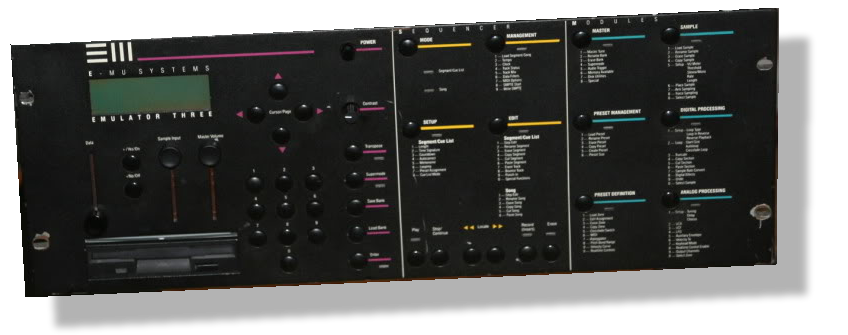
In this day of the age of software samplers where pristine quality is taken for granted, we can forget that high quality sound was very much desired in those samplers, and if it took digital circuitry to do it, so be it - and sacrificing the analog sound was part of the transaction. Of course, these days that is the very appeal of older samplers - the discrete components and the analog circuitry. But back then, it wasn't that important. This is a very important fact to note in the Emulator III's history, as it really is the ultimate statement of the analog sampler. 16-bit and 8mb of memory, but analog circuitry. Nothing beats it. That's why an Emulator III carries such a high price tag on the used sampler market. The rack commands even higher prices, if you can even find one. After the Emax I, and as the Emulator II was aging, Emu realized that the time was ripe to make improvements to the Emax I and rebrand it to the highest name recognition Emu had - EMULATOR. Thursdays the birth of the Emulator III. As mentioned above, the 512k Emax I because the 8mb Emulator III. The 8-bit Emax I became the 16-bit Emulator III. The mono sample Emax I because the stereo sample Emulator III. Not only did the Emulator III get the necessary improvements to make it a true grown-up sampler, but it still had the favorable analog circuitry. Not only that, Emu made some favorable improvements on the synthesis model and interface that made the Primary and Secondary layers easier to deal with. And Sample Names came back! All Emulator III's came with a HUGE HEAVY TANK SCSI Seagate 40mb internal drive. (One problematic aspect / bug discovered later, was that the EIII could not boot up unless it was connected; rather, if that SCSI buss was terminated. It made replacing or supplementing that drive difficult.) Some things stayed the same, such as the basic (questionable) interface model and the 1000 Preset / 100 Sample limit, but honestly those numbers fit the 8mb memory capability just fine. One thing that hasn't been mentioned: Emu as a company had excellent voicers and along the way built up a large quality library of not just synthetic sounds but the entire orchestra - strings, solo and ensemble, woodwinds, brass - everything. When the EIII came out, Emu also released about 10 Volumes of CD titles. Many of those Banks are still in use today. Even when the E4 came out, the EIII library was so good that Emu did not feel the need to transform them into E4 titles, they just released the EIII ones, since the E4 read EIII disks. But in 1993, and again proving people didn't know what they had before they don't have it any longer, Emu released the completely redesigned EIIIX(P and S). Emu did to the EIII what they did to the Emax I - gave it the digital makeover and dispensing with the analog circuitry. There were improvements - SCSI disk space was increased to 2GB, and of course, sound was of higher fidelity on output, even though the samples were still 16-bit. The biggest improvement was the JUMP to 32mb from 8mb. This disguised the doing-away with analog circuitry. And going even further, in 1994 Emu released a "kiddie model" of the EIIIX called the ESi-32. Kiddie? From this point of view, the ESi-32 was a more compact - re: GOOD - version of the EIIIX, plus it extended disk space to 18GB - although it really could only store 4GB at the most, since a Bank could only be 32mb maximum and only 100 Banks were allowed on a disk. Although the initial ESi-32 didn't have SCSI standard, it was added as standard not long after. Later in the 1990's, Emu improved on the ESi-32 with the ESi-2000 and 4000 - both fairly identical with the main feature being up to 128mb of SIMM memory. Emu did this to garner the price point below the new Emulator 4, released in 1994 (details above). To summarize, this section is called E3/ESi because the main synthesis model from the EIII to the ESi-4000 remained the same. If you could get around a EIII, getting around a ESi-4000 would be the exact same thing. Synthesis and File Structure Samples were fully 16-bit. Each Zone in the Preset had their own set of realtime parameters (not global). A Chorus was also included - nice! Envelopes were the standard ADSR type and one LFO was included. Another clever innovation was the ability to link Presets. Say you had a design for a Preset that needed more than two layers/splits; say you want to design a 8 velocity split piano. You could create a master Preset that not only would play itself, but play a linked Preset. That Preset could also link another Preset, and on and on. Since improvements were made where you could assign gapped splits, you could conceivably create a true 8 velocity split instrument. One Super Trivia about the E3/ESi (and the subsequent E4): The playback rate is fixed at 44.1kHz. What? So why does the E3/ESi show different sample rates for each sample object when you see it in the interface? Well, that's only the listed rate, which was derived somehow - on import, on sampling, somewhere. But even if that's true, how does (for example) does the E3/E4 play back a 32kHz sample at 44.1kHz and expect it to be in tune? Well,t eh reason is that there's a tuning parameter in the file that you have no access to, and that tells the engine to play the sample higher/lower in pitch to match that sample rate. It's a hack, frankly. All models (except the initial release of the ESi-32) had SCSI as standard, and the maximum size crept up as new models were introduced. EIII=1GB, EIIIX=2GB, ESi=18GB. Again it needs to be noted that all E3/ESi types could only write up to 100 Banks on a SCSI disk, so with most models a 4GB drive was good enough - the rest of the disk would be wasted anyway. The 128mb ESi2000/4000 max thus would be 12GB. |
|
| Please see the Format Preferences-Emu section in this document for information on the different options you can set for E3/ESi import and export abilities. | |
Translating and Building to Emu E3/ESi Format Care must be given to converting into EIII format since the memory limit is only 8mb. The rest max out 32mb and up, so it is less of a concern. The Conversion Engine's proprietary AIR (Automatic Instrument Technology) has not been linked up to the EIII format as yet, so you have to handle this on your own. The E3/ESi can only read a proprietary SCSI disk/image or proprietary floppy, so in order to convert to E3/ESi, you must always drag from the right and drop on that E3/ESi disk/image on the left. The E3/ESi has no concept of folders so all Banks get written to the root of the drive. NOTE: When you get started creating Emu Banks and you are creating new proprietary Emu disks/images, make sure that in Format Preferences - Emu you have Type set to any of the E3/ESi options. (Usually plain E3 and ESi v3 are preferred.) Since the Emu proprietary disk format is the same for E3, ESi, and E4, the Conversion Engine can't tell with an empty disk which Bank type to convert to. But once a Emu Bank resides on the disk/image, or (in the case of the E4) at least more than one Folder, it knows what the Type must be regardless of the preference setting. Although we understand that multiple Bank types can exist on a Emu-formatted disk/image, we do not allow it as we deem it to be bad practice. Our E3/ESi conversion always filters out extra velocity splits; in other words, if you are trying to import a 6 velocity split Instrument, the Conversion Engine will take the highest split and the next to the lowest split (so the difference is not so drastic). Object names in the E3/ESi are always 16 characters, which is often enough to handle most imported object names. If they are more than that, the Conversion Engine attempts to reduce them while retaining as much of the vital portions of the name as possible, such at stereo indicators (-L -R) and Root key indicators (C5 D#3 etc.). |
Translating Out of E3/ESi Format Every parameter will be attempted to be translated, mapping, looping, velocity splits, envelopes, etc. The listed sample rate will be the sample rate of the destination sample. You can also convert an entire Emu E3/ESi Bank into a Bank-type destination such as SoundFont, Giga, Kronos, Motif, etc. |
Emu Emax Series
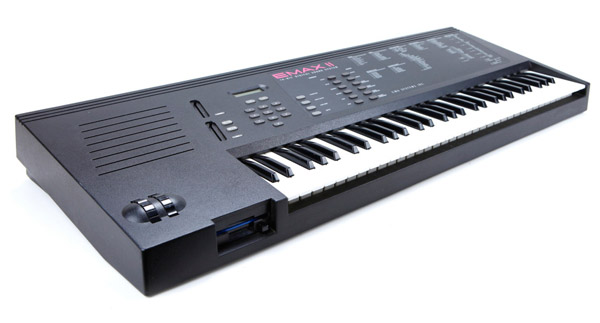
History Or, maybe the attraction to the Emulator II was because of Ferris Bueller. Who knows. Regardless, the Emax I is very underrated. Unfortunately, the current selling prices don't indicate that - those who have Emax I's - especially the rack - know what they have! The Emax I allows for 100 Presets and 100 Samples (okay, perhaps less samples, but over 512k memory? C'mon.) The architecture is rewritten a bit but a lot like the EII; it still uses a Bank as the disk/image, Presets to map out Samples. Each sample still has it's own set of realtime parameters. The Emax I started out with floppy only, but over time there was a HD model which added a 20mb SCSI HDD (it was real SCSI this time), and Plus model that added an external SCSI port. Something really dumb: one of the best writers for Keyboard magazine was a guy named Jim Aiken. He did most of the keyboard reviews and his wealth of knowledge was outstanding. But when he did the review of the Emax, he noticed a particular function called Bird Run, where when invoked, caused a little Emu bird to run across the screen. That was it. Aiken felt that it was a waste of resources and panned it. Well, I guess he had no sense of humor... The Emax I was followed by the Emax II, which added two wonderful things: first it became completely 16-bit in sampling and output and storage, second it added memory expansion up to 8mb. Plus it had SCSI standard. However... this was all a result of reengineering the Emax to use VLSI manufacturing techniques and no more analog discrete components. And that affected the sound - although it was more precise and higher quality, it definitely was less warm and less (say) "musical". But the Emax II was in the right place and the right time and it sold a lot of units for Emu. There was a big black keyboard (pictured here) and a 4-space rack unit. And lets not forget the self-documenting silk-screening of the parameters and pages. If you already knew where everything was, it became plenty of space to put things. Synthesis and File Structure Speaking of SCSI, both Emax's use a proprietary file system on floppy as well as SCSI. The Emax I can be retrofitted with SCSI (some early models cannot). The Emax I system is different than the Emax II; it has a limit of 35 Banks of storage on 20mb max. The Emax II's file system maximum size is 1GB and also requires drives with that capacity or lower, otherwise a bug causes serious issues. Interesting note: The Emax II file system is basically the same that all the subsequent EMu samplers used, with only the E4 adding the concept of multiple folders. The Emax uses 2 "layers" per Preset, called Primary and Secondary. You can assign different samples to each, forming a layered sound or a velocity split. Emu advertises something called "Stereo Voice" but all that is doing is taking two samples (remember the Emax does not have the concept of stereo samples) and panning one hard left and the other hard right. That aspect of the Emax is a little to get used to, as it does this on a key-by-key basis instead of allow you to operate on them separately, as all other samplers do. This annoyance lasted through the E3/ESi series, until the E4 did away with that type of workflow. Both Emax's have resonant filters, even though the Emax II is fully digital with no discrete circuitry. And further, their synthesis model is the same - only the sample size (8-bit to 15-bit) is different. |
|
| Please see the Format Preferences-Emu section in this document for information on the different options you can set for Emax 1 and 2 import and export abilities. | |
Translating and Building to Emu Emax Format The Emax's use a proprietary disk format, so if you are converting to a SCSI disk/image, you'll always drag your source from the right and drop it on the disk/image. If you are converting to a floppy image, use the double-click / Translate button method and create a new floppy image which will house the new Emax bank. We suggest with Emax II only writing to SCSI disk/image as the 16-bit sample size on a DS/DD-sized floppy image is too restrictive. For Emax I, since memory is at a premium, the Conversion Engine limits itself to creating one Bank only on a newly created floppy image, and taking full advantage of the 100 Samples and ~500,000 sample data points available. Most incoming sources exceed that little of memory, so the Conversion Engine uses the AIR (Automatic Instrument Reduction) technology to hammer the sample lengths (and objects) down to where they'll fit. Sample Rates are often immediately dithered down to 27k, although it can go lower if you elect. Samples are dithered down to 8-bit compounded format, saving space, as the Conversion Engine understands how to read and write that system. AIR also merges layered samples so multiple layers - and even the Secondary layer - doesn't have to be used. The Emax does not have a concept of named samples, so when you convert samples from another format, those names will be lost. |
Translating Out of Emu Emax Format Samples will be extracted and converted out of the Bank and converted into the destination format. THe Emax has no concept of sample names, so they will be called "[bankname] Sample 1", "[bankname] Sample 2", etc. This way each Emu Bank does not confuse names. You can also convert an Emax Bank into a Bank-type destination such as SoundFont, Giga, Kronos, Motif, etc. |
Emu Emulator II
History Two floppy drives? Wow! Although they were 5.25 types (soon to be sent to obsolescence), at least it made disk-swapping easier. (It also made the decades-later conversion to Gotek floppy images that much easier.) And even though the unit was heavy and built with tank-like steel, it protected all the discrete components that made it sound great.
The Emulator II had a great run for 2-3 years after being released in 1984, until 1988's Emulator III. Many of the new wave English acts took an extreme liking to it - at least the ones that didn't have Fairlight CMI's, and even those toured with the affectionately-called"EII's". Many Fairlight sounds were sampled onto the EII and through the mix of history the EII got credit for them. Truly it can be said that the Emulator II made sampling mainstream for modern recorded music. Synthesis and File Structure Interestingly, a Voice cannot be mapped over an Octave, reflecting the inability of the EII to transpose a sample that far. The EII sported a 27.7kHz sample rate, but more interestingly, the data was stored as 8-bit but in a ADPCM method (Adaptive Differential Pulse Code Modulation). That's a large term meaning that instead of storing the actual data points, the EII stores the differences between each succeeding data point. This technique improved the actual resolution to something like 14-bit (although that is arbitrary depending on the type of sound). It certainly helped with being able to store 17 seconds of sampling in memory at one time! The EII also brought on board a highly-musical filter with resonance, filter and amplitude envelopes, an LFO, and the usual cast of characters. Each Voice got it's own realtime settings, which is even better. However the EII was a bit too early for being stereo-playback sampler - panning is a foreign concept and there is only one main Mix output, though there are 8 individual Channel outputs. The Emulator II also, throughout it's lifetime, really innovated when it came to storage. Being manufactured on the West Coast, in what was to become Silicon Valley, Emu had access to many new technologies. One of them came from Optical Media International (OMI), which produced a CD-ROM Drive for the EII, with Emu designing a special file system for it. Emu also put a crude SCSI on their HD models; it wasn't really SCSI though, it was a non-SCSI drive adapted to take on SCSI commands. And not only that, all Emu's have a RS-232 computer serial port, which allowed Bank transfer to and from the EII. Digidesign with their Sound Designer software (also a Silicon Valley area company) decided to partner with Emu on this and made this communication just as effective, if not more so, than SCSI drive or CD-ROM Drive access. It should be noted that the OMI innovation pioneered the entire cottage industry of sound libraries released on CD-ROM. (Akai and Best Service Germany took this to huge success, there are 100x more Akai titles that Emu-Roland-Ensoniq-Kurzweil-SampleCell combined.) There are only a couple EII CD-ROM's, all produced by OMI in cooperation with Q-Up Arts, but they started the entire sound library idea. However... even though this innovation was well received and beneficial back in the day, the true benefit wasn't that large since the EII in hindsight had sparse memory to fill in the first place. It was only until samplers got to 8mb, 16mb, 32mb and more mark where SCSI became not only useful but essential. The EII, though, takes about 30sec to load a Bank off a 5.25 floppy, whereas using the RS232 port and Sound Designer it's 19sec and via the HDD it's 14sec. Those aren't relatively and comparatively long times. This same "fast but not a lot of data" pertained to the upcoming Emax I, which only had 512k of memory as well. The Emax II, with the maximum 8mb and enlarged 16-bit bandwidth, proved that SCSI was not just fast but essential. No one wants to use multiple floppy disks to load a Bank. In recent times, not just the vintage sampler revolution resurrected interest in the Emulator II, but also the advent of Floppy Emulators such as Gotek and Flash Floppy firmware. Previously, there wasn't clear and easy ways to get new sounds into the Emulator II; now there is. |
|
| Please see the Format Preferences-Emu section in this document for information on the different options you can set for Emulator II import and export abilities. | |
Translating and Building to Emu Emulator II Format Special note: Emulator II is the only format where you will have to convert the IMG files into HFE files using the HxC Utility. Flash Floppy nor any other firmware does not support Emulator II IMG floppy images, then have to receive the MFM-encoding that the HFE format supplies. Samples become Voices, and incoming Instruments become Presets (that map out the Voices). To address the limitation of only 1 octave keyrange per sample, the Conversion Engine makes multi ranges, and may or may not make extra samples so the EII can transpose them upward easier. Since memory is at a premium, the Conversion Engine limits itself to creating one Bank only on a newly created floppy image, and taking full advantage of the 256 Voices and ~500,000 samples available. Most incoming sources exceed that little of memory, so the Conversion Engine uses the AIR (Automatic Instrument Reduction) technology to hammer the sample lengths (and objects) down to where they'll fit. Sample Rates are often immediately dithered down to 27k, although it can go lower if you elect. Stereo samples get converted into mono, and usually get the right side chopped off, although you do have control of mixing the sides if you want. And, of course, the Emulator II's sample data is stored as 8-bit, so all sample data is converted to that bitrate as well. The Conversion Engine knows the special 8-bit compounded ADPCM scheme and can read and write to it properly. Naming can be a tough issue since names are only 8-chars. The Conversion Engine uses it's ingenuity to compact larger incoming names while making them as clear as possible, as originally intended. Since there are restrictions on Oscillator-level programming and only 4 Oscillators, sometimes multiple Programs must be created to imitate an incoming Program. Programs like this are prefaced with an asterisk (*) and a Mix is created, which can play multiple Programs at one time. |
Translating Out of Emu Emulator II Format Converting out of the EII is much easier than converting into it, since most often your destination has more than a half megabyte of memory. Samples usually become WAVE files and are referenced appropriately. The Conversion Engine knows the special 8-bit compounded ADPCM scheme and can read and write to it properly. You can also convert an entire Emulator II Bank into a Bank-type destination such as SoundFont, Giga, Motif, Kronos, etc. |