
|
Instrument - Group View - View Groups |
A Constructor™ Instrument Document supports the concept of View Groups. A View Group is simply a collection of Sample References that you want to see at a single time; that is, to filter out what you are seeing in the KeyMap window and the Sample Reference List.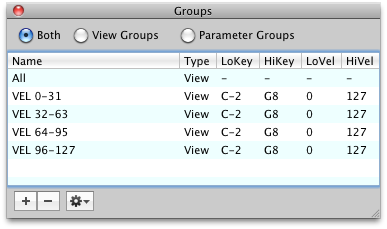
This is a very powerful feature, as you may want to view a single keyrange or velocity range, or a single KeySwitch or Controller switch.
This greatly assists viewing layered references, which hide behind each other in the KeyMap window. It also allows you to edit certain parts of an Instrument while keeping other parts intact and out of sight, out of mind.
View Groups are "cheap and free", you can create any number of them for later recall and use. A Sample Reference can belong to any number of View Groups.
Although View Groups have no direct bearing when you export a Constructor Instrument, you can set them to influence how the exported Instrument will be organized. Some examples of this are a EmulatorX/E4 Voice and the arrangement of Multisamples, or Oscillators in a SampleTank Instrument. Most of the time this is the function of a Parameter Group, but View Groups can be used this way as well.
The "Smart" Setting
Typically you populate a View Group by manually including the Sample References by drag-drop or using the menus in the Reference List or KeyMap Window. The Smart setting allow you to set certain criteria so the Sample References "come to the View Group" instead of having you manually add them.
For example, if you set Smart to include Velocity Range 96-127, any Sample Reference that you include or modify within that setting will automatically include itself in that View Group. This is all done behind the scenes.
See Format Strategies to see if your destination format uses View Groups to organize itself.