|
Instrument - Reference List View |
In Constructor™, all Instruments are made up of basic building blocks that Constructor calls Sample References. A Sample Reference is simply a mono or stereo sample that the Instrument plays under certain circumstances.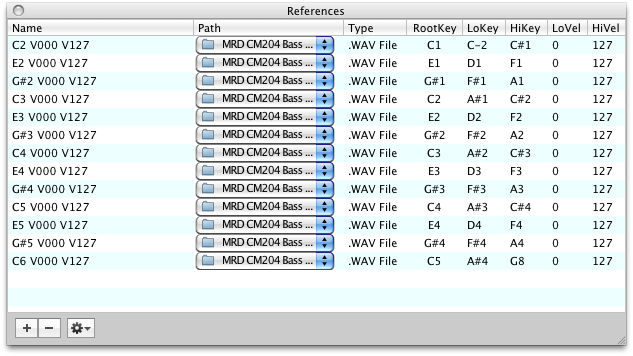
For example, if you hit middle C on a keyboard (MIDI note 60) and the Instrument has assigned the sample "dog bark.wav" to that key, that Sample Reference will audibly play.
The conditions in which that Sample Reference will play are called Rules. Rules can be KeyRanges, Velocity Ranges, KeySwitch numbers, Control Switch numbers, Round Robin numbers, and a host of all sorts of things.
Keep in mind that since Constructor™ supports many different instrument formats, they use often their own terminology. For example, the Kontakt and EXS24 term for Sample Reference is "Zone". The GigaStudio term for Rules is "Dimensions", while Kontakt calls it "Group Start", while EXS24 actually has no term for the concept. The Constructor™ set of terms is unique, but often represents the most common usage. Most importantly, we believe our terminology helps clarity and gets to the point quicker. |
The Reference List shows the currently selected Sample References in your Instrument. The Reference List can be filtered by your own criteria, so you can view AND edit any group of References. These filterings are done by View Groups and Parameter Groups.
The Reference List is tied into the KeyMap view and the Group view. When you change things in the KeyMap view, the Reference List will be changed accordingly. When you select one or more View/Parameter Groups, the Reference List will also change accordingly.
You can also edit Sample References from within the Reference List, as well as add and delete them, using the menus or via drag-drop.