
|
Ensoniq ASR-X Tools™ Basic Concepts |
Ensoniq ASR-X Tools™ goal is to edit or create ASR-X 1-SOUND's, either single Programs or RAM-Kits.  It can edit the ASR-X directly via MIDI, or it can edit .SOU files directly without the ASR-X attached, or both.
The main screen in Ensoniq ASR-X Tools™ shows the structure and parameters of one ASR-X Program. This can be a single 1-SOUND or a RAM-Kit. There is always a Program loaded into the interface. You can load a Program in by two methods:
The edited Program is always stored onto your computer's hard drive as a .sou file. When you get a Program via MIDI from the ASR-X, it is stored on your hard drive as a .SOU file.
As you edit the Program on the Main Screen, if you have your ASR-X hooked up, it will edit it as you are working. Ensoniq ASR-X Tools edits a .SOU in real time as you work on the main screen. All parameters are tabbed so you can have access to all the parameters within a relatively small space on your screen.
The structure of the .SOU file is located in the Outline box on the Program screen. By selecting different waves, the fields underneath the tabs automatically update themselves. Once you make an edit, it is written into the file. No undo is available at this point in the program.
MIDI Parameter Editing
The MIDI tab also gives you another way of selecting a .SOU file. Using the GET PATCH button, you request from the ASR-X the parameters of the sound located at the selected Bank and Program number.
Using a common storage device, usually a SCSI drive, is the most effective way to use ASR-X Tools™. Once ASR-X Tools™ knows where the file is in the ASR-X, it can edit the sound in RAM via sys-ex, and at the same time edit directly to the disk so it doesn’t have to be re-saved.
This is even more important while editing EPS/ASR translated sounds. WARNING! (please EPS/ASR/Akai/Roland MIDI Dump Issue.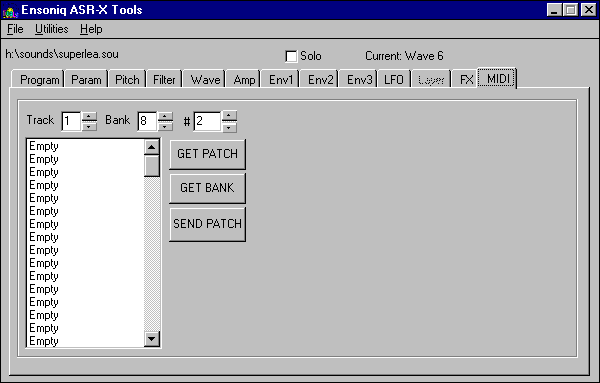
Be careful of one thing - since you are dealing with two separate systems that are sharing one directory structure, you must be careful to make sure each system refreshes it’s directory structure. For example, let’s say you are sharing a SCSI ZipDrive. You use the ASR-X to save a 1-SOUND. But when you look within ASR-X Tools™ to find the file, you won’t see it. That is because Windows has not had the opportunity to refresh it’s directory structure for that drive. You can either pull up Explorer, go to that drive letter, and hit F5 (Refresh); or even easier, you can eject the ZipDisk and reinsert it.
The ASR-X has an easier time with this - it is not as “smart” as Windows, and refreshes the directory structure every time you hit LOAD.