UPDATING CHICKEN SYSTEMS PRODUCTS TO OSX YoSEMITE
Instructions for updating to Yosemite All of Chicken Systems Mac-compatible programs have been tested
and are approved for Apple's new Yosemite OSX 10.10 operating system.
All of Chicken Systems Mac-compatible programs have been tested
and are approved for Apple's new Yosemite OSX 10.10 operating system.
However, for certain users due to some existing Apple bugs, there may be steps you have to take to install it properly.
Installer Won't Run On Yosemite
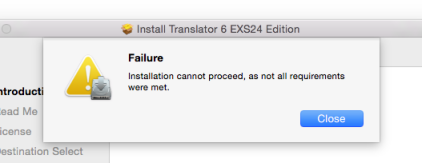
If you are installing any Chicken Systems product from CD on Yosemite, you may get an error, see the dialog to the right.
Here's the fix, it's an Apple/Javascript bug related to the installer (which is Apple-provided).
- - Copy the installer off the CD and on your Desktop (or wherever).
- - Ctl/Right-click and select 'Open Package Contents'
- - A finder window opens with the 'Contents' folder showing, enter into it
- - Duplicate the 'distribution.dat' file for backup
- - Open 'distribution.dat' with TextEdit
- - Edit the '10.4.0' string to have it say '10.04.0'
- - Save the document.
- - Run the installer from that location; it should work.
The problem is that the installers on the CD's have a filter (that we elected to put into it) so any installation attempt on any OSX before 10.4 Tiger will fail. The problem is that the script compares the string '10.10' >= '10.4.0' and for some reason it thinks it is less than '10.4.0'. (We don't know why they are doing string comparisons for equality in the first place.) We've reported the bug to Apple and we'll see how fast they fix it. In the meantime, this workaround works fine.
We've removed the OS check on all updaters to avoid the problem, as we aren't really expecting anyone to try installing any of our products on OS's 10.3 or below anymore. But the installers off the CD are beyond our control, so until Apple fixes this, the above workaround is necessary.
If you want to look at the bug, it is 18795656 'Installer created with Packagemaker with OS check fails in Yosemite' under RADAR. http://bugreport.apple.com
Program Stalls Upon Startup
Another problem that we've seen ocurring is stalling upon start up. We've narrowed this down to be related to an Avid CoreAudio plugin located in /Library/Audio/Plug-Ins/HAL (use Go To Folder... to locate this folder), called Avid CoreAudio.plugin. Removing this file, which seems not to be necessary, solves the problem.