 |
Single Sample Map Preferences |
This panel is for when you are building an Instrument from scratch. (See Bulk Export for more information.)
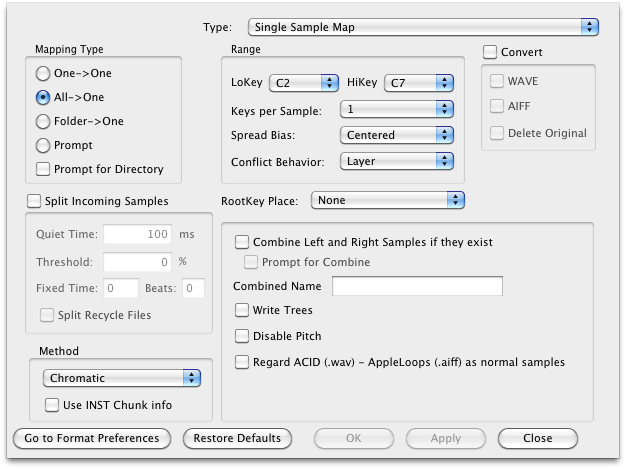
Mapping Type
- One->One: this effectively turns off the feature. It takes each file and translates it like any other file.
- All->One: this is the most common setting. This takes at most 127 files and maps them across the keyboard in the destination format you selected (unless, of course, the destination format supports this).
- Folder->One: same as All->One, except that it automatically searches the file name or namming convention and maps it to the corresponding General MIDI note.
- Prompt (default): Translator will prompt you each time it attempts a translation/map. Annoying, but needed in some cases.
- Prompt for Directory: If checked, Translator will ask you what directory to put all the combined translated files into. This provides you with a way to write the results to a different directory. This is needed especially if you are converting off CD-ROM, as if you don't have this option checked, Translator will try to write the result in the directory it first starts trying to write the file to. (By the way, if you make a mistake in this regard, Translator will forgive you and ask what directory you want to put the resulting file into.)
Combine Left and Right
Default: checked
Write Trees
Default: checked
Set as "Disable Pitch"
Default: unchecked
Lo Key-Hi Key: Sets the key range to map samples to.
Keys per Sample
Default: Max
Spread Bias
Default: Centered
Root Key Place
Default: checked
- Embedded Value (default)
- Name
Split Samples in Export
Default: checked
Quiet Time
Default: 100ms
Threshold
Default: 0%
Fixed Time
Default: 0
Beats
Default: 0
Convert
Default: checked
- WAVE
- AIFF
- Delete Original
If Conflict
- New File
- Low Note (default)
- Hi Note
Combined Name
This is the name that your combined files will take on, plus a digit tacked on afterwards.
Default: Combined