
|
SFZ Preferences |
Collapse To Groups
In the most basic mode, a SFZ file is formed as a Region for every sample reference. SFZ also has a concept of Groups, and parameters can be written there so they don't have to be repeated in every Region. When this option is checked, Groups will be created to perform this function.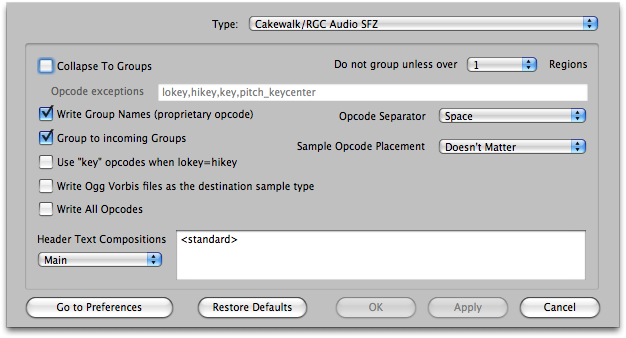
Default: Checked
Opcode Exceptions
You can set any amount of opcodes that WILL NOT be collapsed into Groups if the above is checked. The common ones are lokey, hikey,key,and pitch_keycenter.
Default: checked
Do not group unless over [X] Regions
This sets a threshold on how many Regions are needed for the Group collapsing to occur.
Default: 1 region
Write Group Names
Other formats allow you to name your Groups - why not SFZ? When incoming formats that have named Groups want to be converted into SFZ, this writes a special "name" opcode in the Group to carry the name. THIS IS NOT IN THE SPEC, but it is enormously convenient.
Default: Checked
Group to Incoming Groups
Many new modern formats use the Group concept to contain their Zones, and often these Groups are named. Again, Translator's first call is to obtain an exact translation of the incoming format, but sometimes you also care about the cleanliness of organization of the new SFZ file, because you often want to tweak it to taste afterwards. Check this option if you want Translator to force the incoming Group structures to be preserved, and also named accordingly. This may compromise a perfect translation, sometimes it doesn't matter.
Default: Checked
Use "key" opcode when lokey=hikey
SFZ has a opcode named "key" which is usually misused because the SFZ published public spec is too vague about it. We don't want anyone to use it, but if you REALLY want to, checking this option will use the "key" opcode when the lokey and hikey are the same.
Default: Unchecked
Write Ogg Vorbis files as the destination sample type
SFZ supports .ogg samples, so if you want your new SFZ samples to be Ogg ones, check this option.
Default: Unchecked
Write All Opcodes
If a parameter comes in and it is the default value, Translator doesn't write an opcode. But something you want the opcode to be written so editing is easier. This option writes all the popular opcodes regardless of if they are the default value.
Default: Unchecked
Header Text Compositions
SFZ has the ability to write comment lines. Our SFZ files have a default header text at the top, but this option allows that to be changed to one you select, and you can comment your Groups and Regions too.
Opcode Separator
The SFZ spec says that opcodes have to be separated by whitespace. (Actually it's slightly more complicated, but that's the general idea.) This option gives you four types of white space to separate your Opcodes - a Space, a Carriage Return and Line Feed (CRLF, typically for Windows), just a Carriage Return (CR), or a Line Feed (Mac typical).
Default: Space
Sample Opcode Placement
Every Region has a "sample" opcode. (We do not write samples in Groups, although you can if you want.) This option determines if it is placed at the beginning or the end of a Region, or if it doesn't matter.
Default: Doesn't Matter