
|
SampleTank Preferences |
Write as SampleTank 1/2
This option determines what SampleTank format your destination SampleTank files will be converted as.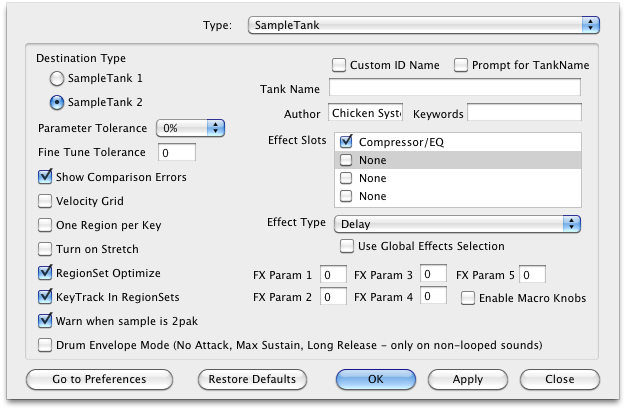
Default: 2
SampleTank Parameter Tolerance
SampleTank Instruments share their envelopes, LFO's, and modulators with all velocities in a keyrange.
Thus, if incoming references require unique values within a keyrange, Translator is either going to write new SampleTank Instruments that accommodate this, or you can use the Parameter Tolerance value (in a percent) to "tolerate" certain values and trade off complexity for the convenience of having a single Instrument represent your incoming Program, rather than having to load multiple instances of SampleTank and load multiple Instruments.
Default: 0%
Fine Tune Tolerance
One particular limitation of SampleTank 1, and 2, is that every sample within a keyrange was to have the same fine tuning offset. This parameter allows you to specify any differences that will be ignored in order to be included in the keyrange without having to create another Instrument. This results in SLIGHTLY out of tune samples - moreso if you set this to high values, less so if you choose to just tolerate small values (which is the intent).
The reason for this parameter is that Tuning is not included in the Parameter Tolerance options, and must be handled separately.
Default: 0
Velocity Grid
This averages incoming velocity ranges to fit a 16-part grid (out of 128 values). For example, a velocity of 5-90 will become 0-95, and 29-120 will become 32-127. This eases the pressure on the limited SampleTank format to acclimate staggered or unusual velocity ranges.
Default: Checked
One Region per Key
A Region is a keyrange. Sometimes in SampleTank you may want one Region for every key; so if a keyrange comes in that is multiple keys, it will make multiple Regions instead of just sharing a single one.
Default: Unchecked
Turn on Stretch
Checking this option turns on the Stretch parameter in SampleTank 2, with a value of 0. This is because SampleTank LE does not allow the user to do this, although it does allow changing the value.
Default: unchecked
RegionSet Optimize
The less RegionSets (in contrast to Regions)
Default: unchecked
RegionSet Optimize
Checking this option turns on the Stretch parameter in SampleTank 2, with a value of 0. This is because SampleTank LE does not allow the user to do this, although it does allow changing the value.
Default: unchecked
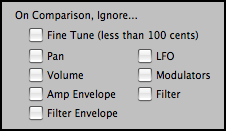
| Go To Comparison Options button Takes you to the master Comparison Options area (under Options). This is Parameter Tolerance from a different angle - on a parameter set basis, you can choose to ignore incoming values when it comes to comparisons. The Parameter Tolerance value is applied to those parameter sets that are not ignored. |
 |
| Show Comparison Errors SampleTank is a limited format, and Translator uses many comparison averaging techniques to cram more complicated formats into SampleTank's limited scheme. This option allows a dialog to come up to allow you to manually control how these comparison averaging functions are applied. This option is handy, not just because it allows you to control the averaging, but it also tells you when a more complicated format is incoming. Default: Checked |
Drum Envelope Mode
SampleTank does not have a parameter that ignores the note-off when it comes to envelopes, which is essential for drum sounds. Checking this option forces SampleTank envelopes to have parameters that simulate this (no attack, max sustain, long release).
Default: unchecked
Custom ID Name
This enables the Tank Name and Author fields to be enabled.
Default: unchecked
Prompt for Tank Name
When converting into SampleTank, checking this will pull up a dialog asking you for the phrase to name the Tank. The Tank Name appears in SampleTank in the information section.
Default: unchecked
Effect Slots/Effect Type/FX Params
You can pre-program what destination SampleTank files will have concerning effects. There are four of them and you can choose what they will be an whether they will be enabled or not. (Note: many early and current versions of SampleTank do not show disabled effects names. Just a warning!).
Currently, the FXParams values are 0-127. In future versions of Translator, these will be more useful, as they will show what the parameter is and what it’s “real” value is (based on a 0-127 range).
Enable Macro Knobs
This enables the Macro Knobs of converted SampleTank instruments.
Default: unchecked