
|
Native Instruments Instrument Preferences |
All these options are information that gets written into the header of any Kontakt file you write. This helps with organization and other things. Please remember that the Category selections are ignored in newer versions of Kontakt such as Kontakt 4.1. 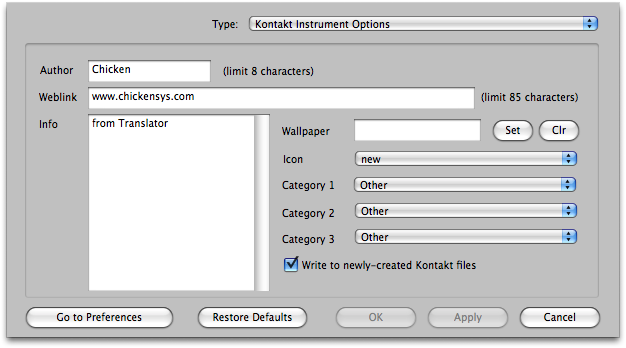
Author: This is the Author of the file, limit is 8 characters.
Weblink: The Website of the manufacturer, limit 85 characters.
Info: Anything you want to type in, unlimited room.
Wallpaper: A wallpaper file you want to attach to your new Kontakt files.
Icon: The icon you want to attach to your new Kontakt files.
Category 1: Usually the type of Instrument it is (e.g. Piano).
Category 2: Usually the sub-type of Instrument it is (e.g. Acoustic [Piano]).
Category 3: Usually the timbre of the sound (e.g. Dark [Acoustic] [Piano]).
Write to newly-created Kontakt Files
Enables the option, this way you can set them and yet disable the process temporarily.
Default: Checked