
|
Yamaha Motif Preferences |
Type
Choose between Motif XF, XS, ES, or Original. Remember that XF can read XS or ES, XS can read ES.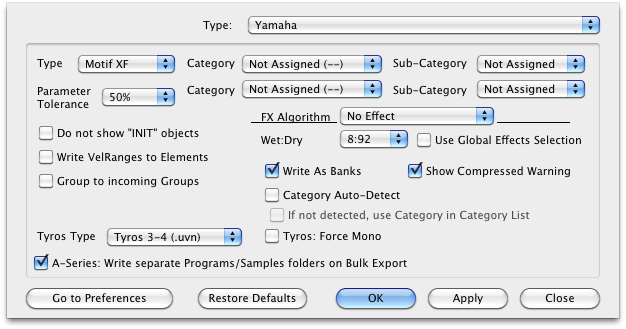
Default: XS
Parameter Tolerance
When converting INTO this format, there may be structural limitations where if you wanted to ensure all parameters were converted perfectly, you'd end up with multiple Programs/Presets being created, perhaps in more of a mess than you prefer. Setting Parameter Tolerance to a higher percentage gives some grace to these parameters so the conversion will be a little exact but you'll wind up with a cleaner organization that will be more usable to you.
Category - Sub-Category
The Motif has a great system that categorizes Voice and Performances. Each Voice/Performance can be categorized into one or two Categories, and each Category has Sub-Categories. Select these for your incoming formats.
Do not show INIT Objects
The Motif has no concept of "blank" Voice or Performance. Anything conceived as "blank" usually is named starting with the word "INIT". When viewing Motif Voices/Performances, you may not want to be concerned with these objects messing up your view. Checking this option stops those objects from being seen.
Default: Checked
Write VelRanges to Elements
A Motif Voice uses it's 4-8 Elements to reference group/keymaps of samples, called Waveforms. A Velocity split can be defined in the Waveform or in the Element. Doing it in the Waveform gives you fine-grained control with the velocity values being set on the sample level, which is a good thing. But you may want to make sure that an Element has all the samples of one certain velocity setting. That way, for example, if you have an incoming 4 Velocity Split format, it will create 4 Elements and the Element will define the split setting.
Default: Unchecked
Group to Incoming Groups
Many new modern formats use the Group concept to contain their sample references. Translator's first call is to obtain an exact translation of the incoming format, but sometimes you also care about the cleanliness of organization of the new file, because you often want to tweak it to taste afterwards. Check this option if you want Translator to force the incoming Group structures to be mapped to Motif Elements. This may compromise a perfect translation, but often it doesn't matter so you can capitalize on better organization.
Default: Checked
FX Algorithm - Wet/Dry - Global Effects Selection
Determines the default effect type that goes into all newly-created Presets, the Wet/Dry balance it has, and if it takes the value or uses the Global Effects option (in Options-Effects).
Write As Banks
If you have an incoming multi-Instrument format (a Bank format), this insures a single Motif file set gets created, instead of several.
Default: Checked
Category Auto-Detect
Translator has a clever feature that looks at the incoming Voice names and makes a decision on which Category(s) it'll set for that Voice. You may or may not want to use this.
Default: Unchecked
Tyros Type
Determines the Tyros format that is converted when selecting Tyros as the the destination format. Selecting Tyros 3 also works on Tyros 4.
Default: Tyros 3-4 (.uvn)