
|
Steinberg HALion Preferences |
Type
Create Internal Folders Based On...
HALion can use a folder structure for organizational purposes and also to ease editing chores. When Translator writes HALion files, this option determine how those folders are written - either by velocity ranges, or by "dimensional" (meaning keyswitches or modwheel-release triggers etc.) means. If there are no velocities and/or "dimensions", no folders will be written.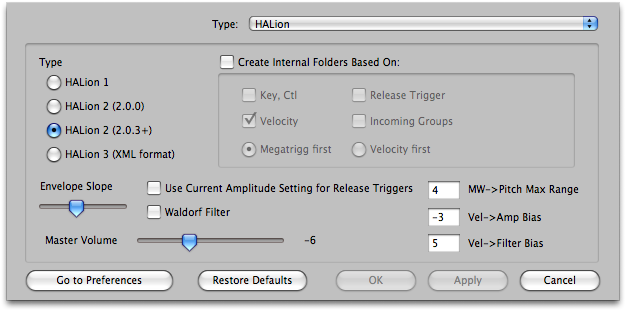
Default: Checked
Envelope Slope
HALion envelopes allow you to set the curve of the change in amplitudes of its envelopes. This is the slope for envelopes IF the slope is not already specified.
Default: 30%
Use Current Amplitude Release Trigger Mode
HALion 2 has a neat feature where you can determine how loud the release trigger sample reference will be. Current Amplitude sets the volume on how loud the normal trigger reference is playing at the time. Checking this option enables this when release triggers are written. However, there are certain times when this option may not be to your liking.
Default: checked
Waldorf Filter
Uses the Waldorf filter types instead of the standard ones.
Default: Unchecked
Master Volume
This is the Master Volume written to a HALion Program when a Master Volume is not specified by the incoming format.
Default: -6 db
MW->Pitch Max Range / Vel->Amp Bias / Vel->Filter Bias
These are extra parameters that have no equivalent in any incoming format. You can set these to your taste.
Default: -6 db