
|
Alesis Fusion Preferences |
Program Type
Determines if the Fusion Program will be a Multisample type or a Drum type (that is, the Oscillators).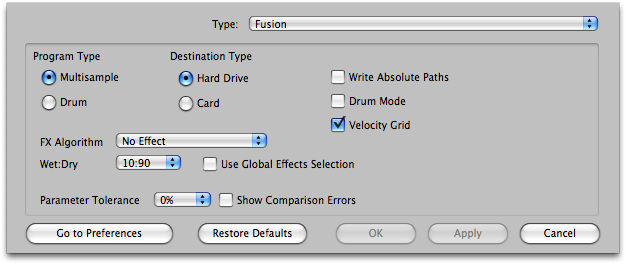
Default: Multisample
Destination Type
Determines what type of Fusion media you will be writing this to.
Default: Hard Drive
Write Absolute Paths
Internally, Fusion Multisample files (.afi) reference their samples with relative paths; they expect them to be in the same Bank. But this doesn't always have to be the case. The option allows you to expand on this feature.
Default: Unchecked
Drum Mode
Controls the release of the Envelopes.
Default: Unchecked
Velocity Grid
This option lines up Velocity values so the line up on a grid, so they aren't all over the place - sometimes older Programs have them shifted around so they overlap or become incongruous by mistake.
Effect Type - Wet/Dry - Global Effects Selection - Main or Preset
Determines the default effect type that goes into all newly-created Presets, the Wet/Dry balance it has, and if it takes the value or uses the Global Effects option (in Options-Effects).
Parameter Tolerance
When converting INTO this format, there may be structural limitations where if you wanted to ensure all parameters were converted perfectly, you'd end up with multiple Programs/Presets being created, perhaps in more of a mess than you prefer. Setting Parameter Tolerance to a higher percentage gives some grace to these parameters so the conversion will be a little exact but you'll wind up with a cleaner organization that will be more usable to you.
Go To Comparison Options button
Takes you to the master Comparison Options area (under Options). This is Parameter Tolerance from a different angle - on a parameter set basis, you can choose to ignore incoming values when it comes to comparisons. The Parameter Tolerance value is applied to those parameter sets that are not ignored.
Show Comparison Errors
Fusion is a limited format, and Translator uses many comparison averaging techniques to cram more complicated formats into the Fusions limited scheme. This option allows a dialog to come up to allow you to manually control how these comparison averaging functions are applied. This option is handy, not just because it allows you to control the averaging, but it also tells you when a more complicated format is incoming.
Default: Checked