
|
EXS24 Preferences |
Destination Sample Type
This selects if the sample files rendered as a result of a conversion are WAVE, AIFF, or CAF files. If the source uses WAVE or AIFF files, and some other formats is selected here, the samples will be copied and rendered as the Destination Sample Type that is selected.
Default: WAVE
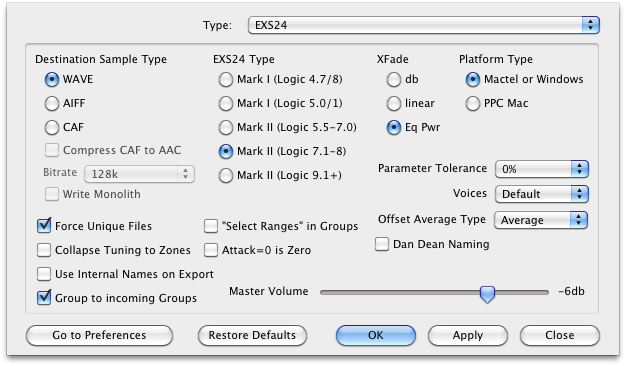
Compress CAF to AAC / Bitrate
If CAF is selected above, the option tells Translator to use the Apple Lossless (AAC) format instead of straight PCM data. You can also specify the bitrate of the AAC encoding.
Default: Unchecked
Write Monolith
Writes EXS monolith files when converting into EXS format. (Warning: we are not sure how accurate or worthy this function is.)
Default: Unchecked
EXS24 Type
If this is checked, directories, all generated files will be guaranteed a unique file name, instead of prompting you when a pending filename already has been used. This is done by adding a unique numeral to the end of the file name.
Default: Checked
XFade
This is the XFade value of the EXS-24. You can preset this parameter based on your personal preference;
db, linear, Eq Pwr.
Default: Equal Power
Platform Type
Most Mac's are Intel now, so Mactel/Windows is the recommended setting. If PPC Mac is set, those EXS24 files are more easily read by PPC Mac's; however, any EXS24 can read them.
Default: Intel
Force Unique Files
If this is checked, directories, all generated files will be guaranteed a unique file name, instead of prompting you when a pending filename already has been used. This is done by adding a unique numeral to the end of the file name.
Default: Checked
Collapse Tuning
There are 3 levels of tuning; Instrument, Group, and Zone. Sometimes an incoming format comes in with the tunings separated, sometimes not. If this option is checked, then any separated tunings are collapsed into the Zone, instead of being spread into the Groups and Instruments.
Default: Checked
Use Internal Names for Export
When converting out of EXS-24 format, this option chooses whether the Master Name used in the destination will be the Internal name stored in the file, or the .exs file name itself. Note: this should be unchecked most of the time for EXS24.
Default: Unchecked
Group to Incoming Groups
Many new modern formats use the Group concept to contain their Zones, and often these Groups are named. Again, Translator's first call is to obtain an exact translation of the incoming format, but sometimes you also care about the cleanliness of organization of the new EXS24 file, because you often want to tweak it to taste afterwards. Check this option if you want Translator to force the incoming Group structures to be preserved, and also named accordingly. This may compromise a perfect translation, sometimes it doesn't matter.
Default: Checked
Write Sample Selects in Groups
The EXS-24 uses the term "Select Range" to determine when a Zone plays, in relation to the modulator that is set to Sample Select. These Ranges can be written into the Zones or the Groups, depending on your preference. Writing them into the Zones enables less Groups to be written, and enables the Zones to be more portable and in dependant. Writing the Selects into the Groups sometimes allows a cleaner organization of structure.
Default: unchecked
Attack 0=Zero
When exporting out of EXS-24 into other formats, this determines whether the setting of 0 in the attack envelope REALLY means 0. The reason for this is because setting an EXS Attack to 0 is not as snappy as other samplers; it doesn't have a "click" associated with it - it is always smoothed out. As a result, when exporting drums you won't get optimum results in the destination files.
Checking this option results in the attack time set to 0ms; otherwise, it is set to 10ms.
Default: unchecked
Parameter Tolerance
The EXS24 writes most of it's parameters to a global parameter set, except some overrides that are entered into the Groups. These are the amplitude envelope, the filter cutoff, and the filter resonance. If many keygroups/zones that are being translated have widely differing amp envelope values, etc., there will be many groups that are formed. To keep this at a minimum, use this option to round together these values so not as many Groups are created. Higher values have a greater effect. There is nothing wrong with lot's of groups being created, but for an organizational measure, this may be desired.
Default: unchecked
Voices
This determines the Voice Amount that will be written, IF the Voice amount is not determined by the source format. Default is dependant on the maximum value of the destination (EXS="Max", HALion=32, Reason=32, Kontakt=128)
Default: Default
Master Volume
This is the Master Volume written to a EXS24 instrument when a Master Volume is not specified by the incoming format.
Default: -6 db