
|
Partial/Patch Editor |
Just like the MV-8000, MV Kit Creator™ has 6 Pad Banks of 16 Pads each. Each PadBank corresponds to 16 consective keys on a keyboard, starting with A0 (MIDI note 21, MV Kit Creator™ regards middle C as C2). When clicking on a Pad (or accessing it via MIDI), the basic setup of that Pad appears on the Main Screen. This includes the sample assigned to each of the 4 Zones, the velocity values, and the volume.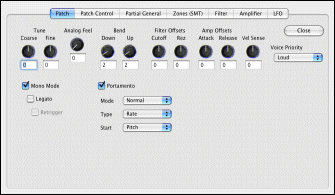
Every Project has one set of Patch Parameters and one Pertial for every Pad. The Partial/Patch Editor is where you edit most of these parameters.
You access the Partial/Patch Editor in two ways:
When the Partial/Patch Editor appears, it is able to edit the currently selected Partial and the global patch for that Project. Please remember that editing the Patch parameters affects EVERY Pad's sounds.
When you twist a knob, generally the resoltuion allows you to twist the entire travel in a reasonable up-down motion. If you'd like finer control of the knob, press Control while you twist the knob.
For more details on each Tab in the Partial/Patch Editor, click below.
| Go to: | Patch | Patch Control | Partial General | SMT | Amp | Filter | LFO |
| MV Kit Creator™ LE Limitations: You can edit your Partials or Patch, but all edits are not saved when exiting the Editor. |