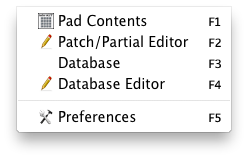
Pad Contents
This opens the Pad Contents window. (Clicking the F1 Function Button causes it to close.) Note: this is set to Ctl-F1 on Windows, since F1 is commonly used to open the Help File.
Partial/Patch Editor
This opens the Partial/Pad Editor of the currently selected Pad.
Sound Database
This opens the Sound Database Simple Interface. (Clicking the F3 Function Button causes it to close.)
Sound Database Editor
This opens the Sound Database Editor. (Clicking the F4 Function Button causes it to close.)
Preferences
This opens the Preferences dialog.
|