 |
Main Top Screen |
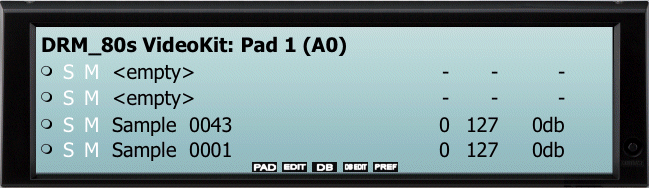
The Main Screen shows the current Project Name, what Pad is currently selected and showing, and the contents of each Zone.
Each Zone has the following information:
- A MIDI or Pad-Play indicator. This shows when the pad is stuck and released, via MIDI or via clicking it on the interface.
- A Solo/Mute function. Clicking the S solos the Zone and mutes the rest. Clicking the M mutes or unmutes the Zone.
- The name of the sample assigned to that Zone. "<empty>" means no sample is assigned to that Zone. Clicking on this area enables you to choose another sample (WAVE or AIFF) to occupy this area. Right-Clicking allows importing or deleting of that Zone.
- LoVel, HiVel, and Volume from left to right. Vels are 0-127, Volume is -96db to +12db.
The five function labels on the bottom are for the five Function Buttons below them.