 The SCSI Memory Card Update The SCSI Memory Card Update
August 27th, 2015 - A couple weeks ago we posted an article about new SCSI-Memory Card solutions. That article was wildly popular and fostered many follow-up questions we answered via email.
Click here to read that article it it's entirety.
Below is some follow up information, gleaned from those emails and also from some additional testing we've done.
Ensoniq Support
Ensoniq has a top limit of disk capacity of 8GB, which corresponds to the File Allocation Table method of it's disk format, which consistent of 24-bit entries. Each entry corresponds to a standard 512-byte sector size, and do the math and that works out to 8GB.
However, a common issue with disks (long since addressed in regular computer OS's) is that most deal with only dealing with 32-bit numbers. A unsigned 32-bit integer can count only as high as 4GB (in bytes). So any scheme that has disks above 4GB usually has to deal with 64-bit numbers, or not ever deal with things in a byte-byte fashion.
An Ensoniq CAN deal with disks >4GB, but (usually) if you format one with the Ensoniq, it will error after wiping the disk when it hits the 4GB mark. This is okay, you can access he disk upon restarting and then you can write the OS on the disk.
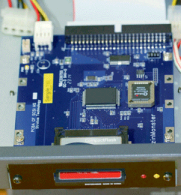
 Now, regarding the SCSI2SD, we did some tests. First, using the firmware configuration utility, we set it to address 8GB. It comes from the factory set to 2GB, so in the past we could only format up to 2GB - the Ensoniq would think it's only a 2GB disk maximum, no matter what size MicroSD card was in the holder. Now, regarding the SCSI2SD, we did some tests. First, using the firmware configuration utility, we set it to address 8GB. It comes from the factory set to 2GB, so in the past we could only format up to 2GB - the Ensoniq would think it's only a 2GB disk maximum, no matter what size MicroSD card was in the holder.
There was several interesting results. First off, it formatted up to 8GB just fine. GREAT! Also, strangely the ASR-10 did not crash which wiping the disk as part of the format. Why this is we just don't know. Also, we found that the FREE DISK BLOCKS indicator on the Ensoniq isn't correct when dealing with disks >4GB, it rounds to the nearest 4GB. So if you format an 8GB MicroSD, FREE DISK BLOCKS will show about 3.5GB. When you use the disk, this figure will go down until it hits 0, then flip back to show around 4GB, and go down from there - at this point the FREE DISK BLOCKS is correct.
Other Samplers
Only two proprietary disks samplers, the Ensoniq EPS/ASR and the Emu Emulator 4, support disks above 2GB. Akai's top out at 510mb and the Roland S-7x max is 603mb. Kurzweil's and Yamaha's have partitioning schemes that limit the partitions to 2GB, and Peavey, Synclavier, Fairlight, and Waveframe all are limited at 2GB. Ensoniq's, as said before, are maxed at 8GB and Emu's go up to 18GB.
A user, Graham Hunter of Bellevue, WA, told us he uses a SCSI2SD for his Emu Emulator 4. He set up the configuration utility to 16GB with 2 partitions. What that does is "show" a 16GB MicroSD card as two separate drives to the outside world (the Emu), so when you see things in the Emu, you see two 8GB capacity drives.
The Raizin Monster and the Fuzin Monster, by ArtMix. , doesn't have the flexible configuration utility SCSI2SD does but simply shows drive as it is, just like most other SCSI drives. That isn't a bad thing, you just don't have the extra flexibility.
To clean up the discussion, we should note that Chicken Systems products strongly add value to these solutions, with the Internal ZipDrive kit being helpful for Ensoniq internal installations, on all three samplers - 16-Plus, ASR-10, and ASR-X. (With other samplers, they have internal 50-pin connectors, rather than the Ensoniq 26-pin ones, thus these are not needed.)
Don't let the moniker "ZipDrive" fool you, the cable kit is simply to convert the cabling internally. It doesn't matter if's it a ZipDrive or a memory card solution. Also, Translator can format any memory card, usually many times faster than the sampler can format it. We've put this in Translator Free also, for use for everyone.
If you have any questions, don't hesitate to ask at [email protected] or call us at 320-235-9798 or 800-877-6377.
|